
You are here:
Use Natural Language Search
Natural language search (NLS) gives you quick access to lists of records so that you can find the information that you need. Enter everyday words and phrases, such as my open opportunities this month or cases closed last week in the global search bar.
Einstein Search shows NLS results only when it recognizes the intent of your search. To improve the accuracy of search results, Einstein Search ignores stop words, which are common words that have no semantic value for finding results that match your search. Stop-words include articles (the, a, an), pronouns (he, she, it), and prepositions (above, before). And you can still see standard keyword-based search results when you want to.
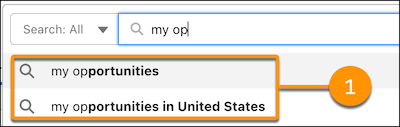
We provide examples to help you get started. Click the global search bar and enter text. Salesforce suggests relevant natural language searches (1).

- Natural Language Search Examples
Start a natural language search using one of the supported objects. You can use a combination of words and phrases. The table shows examples for each object. After you define a word, enter your search terms, and then press Enter (Windows) or Return (Mac) to see your search results. - Enhance Natural Language Search
Make natural language search more personalized and useful. You can receive results based on your location and rename objects to names more relevant to your business, and rank the opportunities and leads that are most important to you. Also, you can explore how picklists and operators break down your search. - Natural Language Search Limitations
When using Natural Language Search (NLS), keep these limitations in mind.
