
You are here:
Einstein Search Limitations
Keep these considerations and limitations in mind when using Einstein Search.
- You can search these field types on custom and standard objects in your org by default: Auto Number, Email, External Lookup Relationship, Phone, Text, Text Area, Text Area (Long), and Text Area (Rich).
- You can search the Picklist and Picklist (Multi-Select) field types in the list view. To view the picklist fields in global search and other search channels, define these fields as searchable in Search Manager.
- The Limit search to option, which lets users restrict the search to a specific object, isn’t available in Einstein Search. Instead, use the dropdown list to the left of the search bar to limit the search. To filter the list, type the object’s name or scroll through the list, and then select the object you want.
- For instant results, which you see as you type in the search bar, search only looks at the record name. If you search for the value of the secondary field, which is the first eligible field in your search layout, those records aren’t included in your instant results. The exceptions are objects whose record name is an auto-number, like cases. For these objects, search returns results based on the secondary field, under certain circumstances.
- For instant results, Search Manager can’t add fields as searchable if they aren’t searchable by default. For example, if you define a picklist field as searchable in Search Manager, it still isn’t searchable in instant results.
- Search doesn’t return results for fields with field visibility restrictions, which include:
- Fields blocked by field-level security settings.
- Fields blocked by the Enhanced Personal Information Management permission.
- Fields where Work.com employee field visibility rules are applied.
- Fields that have a FieldRestrictionRule metadata type applied.
- If a value has translations available, search only works for the English value and not the translated value.
Einstein Search Differences on an iPad
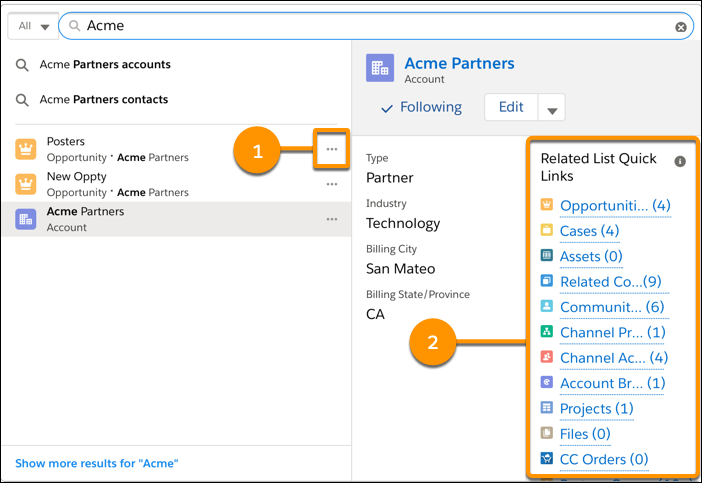
If you view Lightning Experience on an iPad, Einstein Search record previews and related list quick links don’t show hover pages.
- Limitations for Document Text, Picklists, and Restricted Fields
Limits for searching document text, sorting picklists, and searching objects with hidden fields can impact search results. - Right-to-Left (RTL) Language Limitations
For right-to-left language users, search supports Hebrew and Arabic as end-user languages and Urdu as a platform language. For these languages, Salesforce provides limited support for global search and lookup search features in Lightning Experience. - Search Query Limits
Limits on search queries protect against service disruptions and help ensure optimal performance for normal usage.
Did this article solve your issue?
Let us know so we can improve!
