
You are here:
Get Insights with Search Analytics
Discover actionable insights with Search Analytics. Build dashboards to analyze your data. Use insights to make changes to the search engine, optimize content, and train users.
Required Editions
| Available in: All Editions supported by Data Cloud. See Data Cloud edition availability. |
Search Analytics works on Data Cloud with data lake objects (DLOs), data model objects (DMOs), and calculated insights (CIs). In orgs with CRM Analytics, we provide dashboards to view trends in your data. You can also build custom reports and dashboards for your Search Analytics data and share Search Analytics data across connected Data Cloud One companion orgs. See Data Cloud Reports and Dashboards.
How Does Search Analytics Work?
Search Analytics gathers events from search-related logs and computes metrics based on these events. You can analyze these events and metrics in Data Cloud through DMOs and CIs. You can also include user data in your Search Analytics metrics to get targeted insights.
Events are either user actions or system actions. Search Analytics gathers these events.
- Queries—the user executes a query.
- Impressions—the system shows the search results.
- Interactions—the user interacts with a search result.
Metrics are aggregated over events and computed by using formulas in CIs. For example, some available metrics are the number of clicked articles and the mean reciprocal rank of the results that were interacted with. Search Analytics provides several metrics, but you can also create your own from the provided events.
Search Analytics Dashboard
Use the dashboard to view trends in your data.
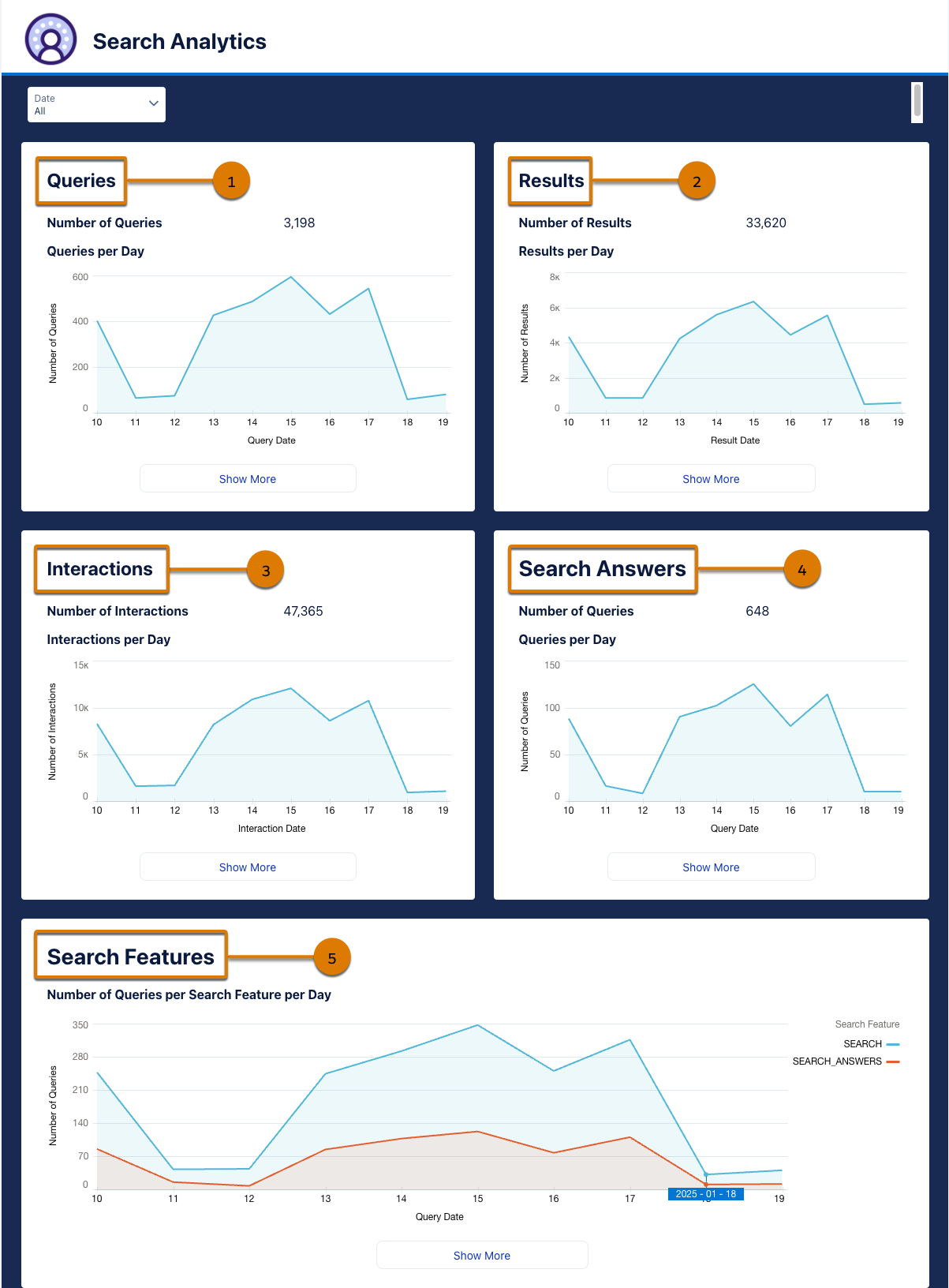
See graphs about:
- Queries (1), such as the number of queries per day.
- Results (2), such as the percentage of queries with results per day.
- Interactions (3), such as the most interacted queries.
- Search Answers (4) queries where Einstein extracts the most relevant snippet and creates summarized responses tailored to user questions based on knowledge articles or other sources.
- Search Features (5), such as the number of queries per search feature per day.
User Insights Dashboard
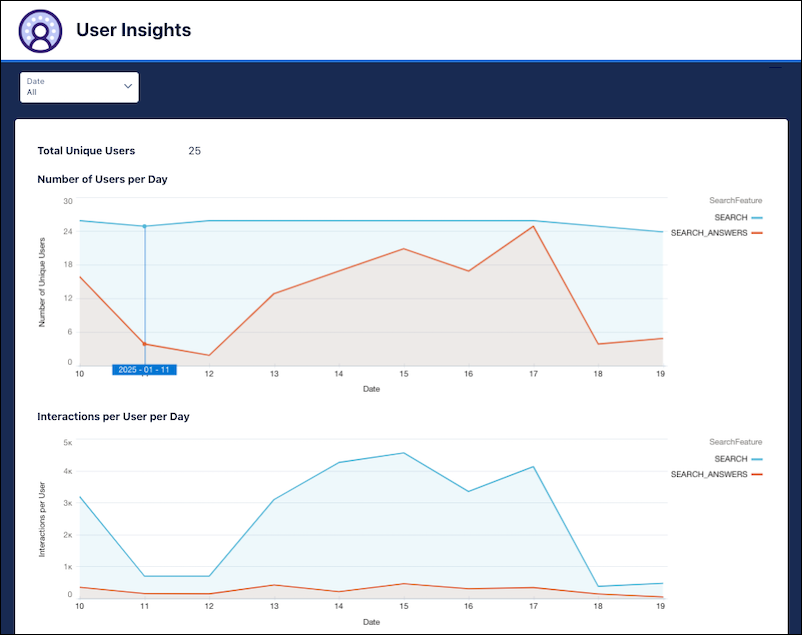
Use the dashboard to see daily search performance for your users.
- Enable Search Analytics
To use Search Analytics, you need a Data Cloud license and Data Cloud credits. To include user data in Search Analytics, you must first enable search analytics. - Enable Search Analytics for Data Cloud One Companion Orgs
Share Search Analytics data from a Data Cloud home org with Data Cloud One users in connected companion orgs. - Access the Search Analytics Dashboards
Search Analytics provides dashboards to analyze data about search in your Salesforce org. The dashboards contain graphs to view trends about queries and articles. - Understand the Search Analytics Dashboard
Explore the components in the Search Analytics Dashboard, including the data model objects (DMOs) and calculated insights (CIs) that power the data and what each chart or table shows. - Create a Case Closure Calculated Insight
Create a calculated insight (CI) with case-related metrics by using example SQL expressions. Use the CI to see how many interactions happen before the case is closed, to analyze case-related metrics, and to build dashboards. - Update the Date Filter in Search Analytics Calculated Insights
Calculated insights (CIs) power the data in the Search Analytics dashboards. Some Search Analytics CIs filter out older data so you can make decisions based on the most up-to-date information. To customize CIs and see data for specific data ranges, you can update the SQL expressions. - Search Analytics Considerations
Keep a few considerations in mind when using Search Analytics. - Search Analytics Reference
Learn about the data model objects (DMOs) and calculated insights (CIs) that Search Analytics uses. - Billing Considerations for Search Analytics
Search Analytics works on Data Cloud with data lake objects (DLOs), data model objects (DMOs), and calculated insights (CIs). Using Data Cloud features for Search Analytics impacts credit consumption and has billing implications.
