
You are here:
Field-Level Security Applied in Search: FAQ
Before the Summer 24 release, Salesforce search results sometimes returned unexpected outcomes under certain circumstances due to a limitation in how Search applies Field Level Security. This limitation arises because Search applies Field-Level Security to all standard fields and the first 100 searchable custom fields, but not to custom fields beyond the 100th. Therefore, searches can use these unprotected fields to return results.
When a user types in a search term that appears in one of the custom fields beyond the first 100, the field-level security isn’t honored. As a result, search results might include records based on this field, even though the user can’t access the field directly. Moreover, users don’t gain access to records or fields they don’t already have permission to view. For example, if a search on a field beyond the first 100 matches 10 records but the user only has access to 5, only those 5 records will appear in the search results.
Salesforce has introduced a capability that allows you to select the custom fields for which Field-Level Security (FLS) will be honored.
-
Provide an example of how FLS is currently implemented in Search.
Consider an employee object containing records for all employees. Among these is a 'Trade Union' field positioned beyond the initial 100 custom searchable fields (for example, the 105th field). Now, it influences search results even if the user lacks access due to the Field Level Security enforced on that field. For example, if the user searches for a specific trade union value that they’re aware of, the search may return all employee records associated with that trade union.
It’s important to note a few key points here:
- Users can see employee records returned through search results only if they have access to them. Records inaccessible to users won't appear in search results, maintaining standard object platform security.
- Despite search results being influenced by the 'Trade Union' field, users lack direct access to this field. As a result, the search results won't display the actual field responsible for the returned results. This makes it challenging for users to understand the context of the results, as they're unaware of the field driving the search.
-
What is the current impact of this limitation in Search when applying FLS?
The likely current impact is low and mostly pertains to edge cases. However, you’re advised to review your fields to mitigate any potential risks associated with possible misuse by users.
-
What orgs are impacted?
Sandboxes and production orgs are impacted.
-
What will the impact be on users?
The impact on users is likely to be minimal. However, users who frequently search using specific terms that previously retrieved results from unprotected fields may notice some differences in their search results.
-
How can I quickly identify the list of unprotected fields?
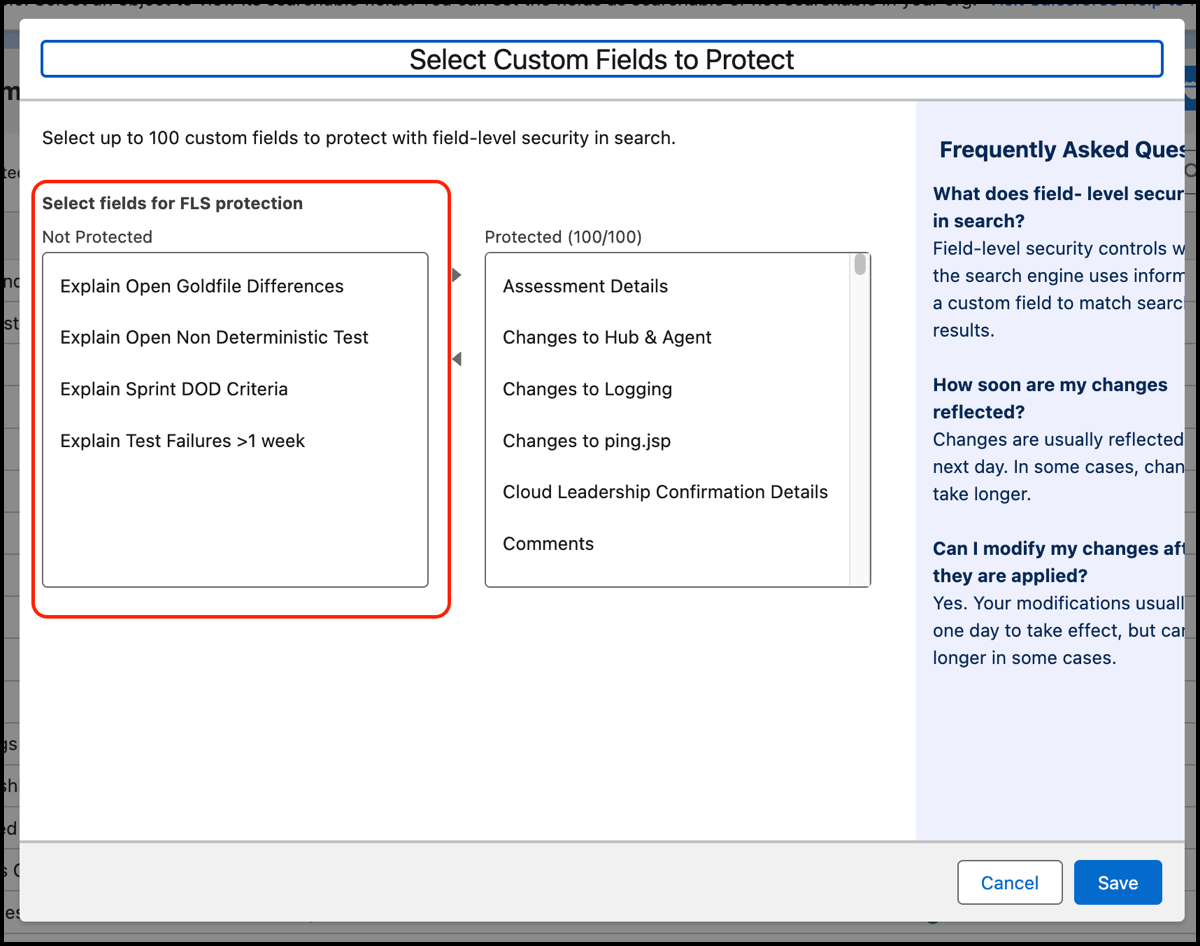
Click Manage Field-Level Security for Search and refer to the list on the left side.

-
How can I address this limitation in Search when applying FLS?
A functionality to protect custom fields in Search is available in the Search Manager node in Setup, enabling you to:
- Identify objects with more than 100 custom searchable fields (which may be impacted).
- View which fields on each object are protected in Search.
- Select or deselect fields to be included in the 100 protected fields.
- De-index custom fields to exclude them from Search.
For more information, see Field-Level Security for Custom Fields in Search.
You must take the following actions:
- Review each impacted object in your org. Ensure that fields users don’t have access to are included in the first hundred custom fields. These fields could provide unwanted context to records returned in search results.
- Make the necessary changes in the Search Manager node in Setup.
-
Where can I find instructions for applying field-level security to custom fields in Search?
For instructions on applying FLS to custom fields, see Field-Level Security for Custom Fields in Search.
-
What happens if I don’t implement this feature?
The impact on your org is likely low due to the specific knowledge and system access required for a malicious user to exploit this vulnerability. However, if you take no action, your org remains as it is today, and the potential for an end user to exploit this gap exists.
-
When can I access the feature to determine impact and take action?
Starting June 12, 2024 you can review your sandboxes to assess any impact and identify the necessary actions to be taken when the feature becomes available in production orgs on June 17, 2024.
-
How soon should I take action?
There’s no strict timeline for making these changes and your org continues to function as it currently does. However, you’re recommended to update promptly to minimize any potential risks from malicious users.
-
How soon will changes take effect after implementing FLS for Search?
Most changes are reflected the next day, but depending on the complexity of the org, it could take longer, similar to other search updates.
A banner is displayed on the updated Object page in the Search Manager while the changes are pending.
-
Can I get more than 100 secure custom fields?
No, the maximum number of fields that can be secured is 100.
-
What if I have more than 100 custom searchable fields that need protection on an object?
If you have over 100 custom fields, you have the following options:
- Swapping FLS and non-FLS fields as needed.
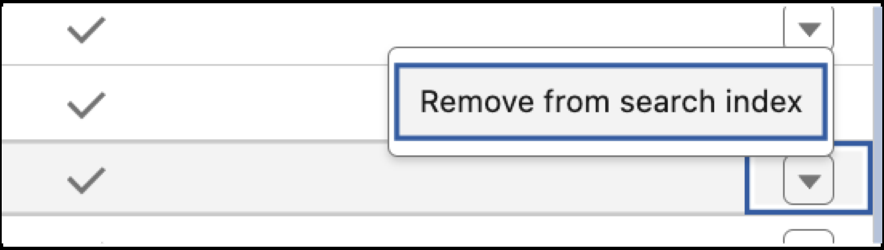
- De-indexing certain fields. To de-index, select Remove from the search index as
shown in the following screenshot:
-
What can I do about the Knowledge object?
The Knowledge object doesn’t currently support the mechanism for protecting most standard and custom fields. Therefore, admins can’t change FLS settings on fields for this object.
-
How might a malicious user exploit the current limitation?
Although users don’t gain access to records or fields beyond their permissions, a malicious user aware of this gap could potentially manipulate the context of records returned in search results. To exploit this vulnerability, the user must have:
- Access to the object
- Access to the records
- An understanding of fields on objects they don’t have access to
- Knowledge of the values in those fields
While the probability of someone having both the necessary access and knowledge is low, it's recommended that you take proactive measures to mitigate any potential risk using this functionality.
-
How to contact customer support and provide feedback?
To contact Support, see Contact Salesforce Customer Support.
To provide feedback, use this form.
