
You are here:
Secondary Field Usage and Limitations
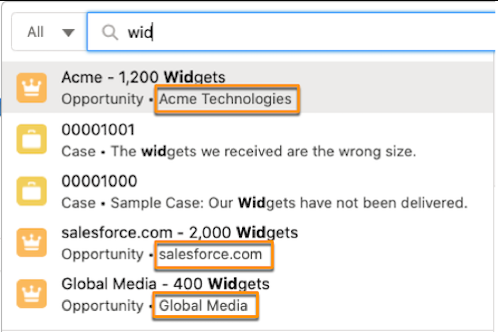
The secondary field provides context to help you determine which record is the one you’re looking for. From the global search bar, the secondary field is beneath the record name and next to the object type. For lookups, it’s below the record name. Advanced lookup matches results against all searchable fields in a record, including the secondary field, while lookup suggestions don’t.
When you type in the global search bar or do a lookup search, you can get results with similar information. To identify the right record, your results show a secondary field, if available.
For example, Acme Technologies, the secondary field under 1,200 Widgets, helps identify which account this particular opportunity is with.
What Determines the Secondary Field?
The secondary field is the first eligible field in the search layout. Not all fields can be secondary fields. When your admin chooses which record fields to show and the order of those fields in the search layout, those choices determine the secondary field.
As you type in the search bar, instant results only include certain types of fields as secondary fields.
| Supported Fields in Global Search | Supported Fields in Lookup Search | Unsupported Fields |
|---|---|---|
|
|
|
Secondary Field Considerations
- Secondary fields aren’t always shown for recently viewed items.
- For global search suggestions and lookup suggestions, search only matches against the record
name, not against the secondary field. The exception is an object whose record name is an
auto-number, such as cases. For auto-number records, search returns results based on the
secondary field, unless you disable the searchability of the secondary field in Search
Manager.
- For the secondary field to be searchable, it must be a Text type field.
- When you select a new secondary field, the new secondary field data isn’t searchable until the content is reindexed.
- If the search results layout includes fields that aren’t supported as secondary fields, no secondary field is shown.
- For contacts and opportunities, the related account lookup field or associated account is the secondary field by default and can’t be customized.
- Lookup suggestions and secondary fields aren’t supported in Experience Cloud sites.
- The secondary field is based on the object's default search layout configuration. An object's profile-based search layout configuration doesn’t affect the secondary field.
