
You are here:
Search for Records
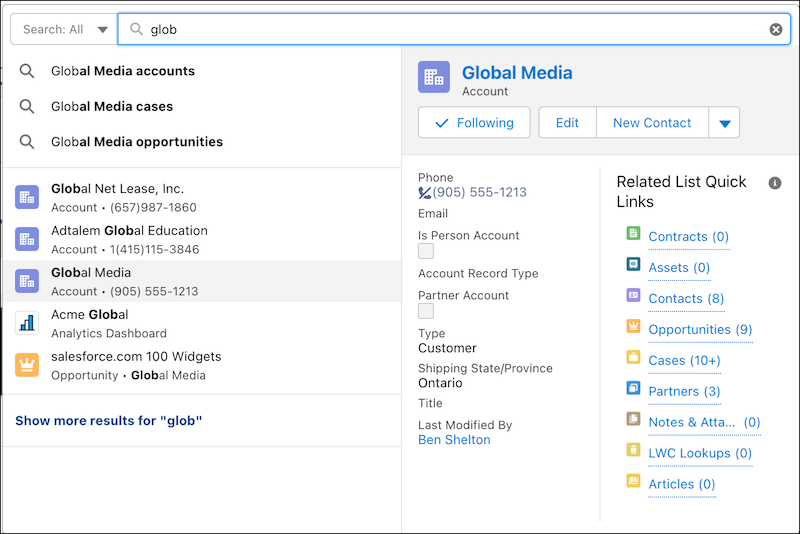
Your search for records begins with the global search bar at the top of each page. From the moment you click the search bar, search starts delivering results.
When you click the search bar, search provides you suggested searches and record previews. These results are based on your recently viewed records. Begin typing your search term and search adjusts results further. You can also filter your search to a specific object. Select an object from the dropdown list next to the global search bar or place your cursor at the top of the dropdown list and type the object name. If you still don’t see what you’re looking for, perform a full search, such as typing your search terms and pressing Enter (Windows) or Return (Mac).
Search also returns results for similar or related terms when you apply:
| Applied: | Result: |
|---|---|
| Nicknames | Results include similar names, like Mike for Michael. |
| Spell correction | Spell-corrected versions of search terms are returned, like widget for the misspelled word widgte. |
| Lemmatization | Matches for other forms of a word are returned, like sell, selling, and sold. |
| Expanded searches | Records whose name contains part of the term you entered, like laptop for lap. |
| Special characters | If you enter terms with punctuation or special characters, records with similar names are returned, like 1234.SILVER for XYZ-1234-SILVER. |
| Synonym groups (set up by an admin) | Groups of words or phrases that search treats equally, like USB drive, flash drive, and memory stick. |
