
Update Your Routing Logic for Agentforce Service Agent on Email
Nearly all of the puzzle pieces are in place, but Salesforce still needs to know when the agent should use your email template to email customers. We recommend creating an Omni-Channel flow that controls which cases are routed to your Agentforce Service agent versus a service rep.
Required Editions
| Available in: Lightning Experience |
| Available in: Enterprise, Performance, Unlimited, and Developer Editions. Required add-on licenses vary by agent type. |
To learn about channel support for other agent types, see the documentation for that type. |


| User Permissions Needed | |
|---|---|
| To create email templates: | Lightning Experience User |
| To edit public email templates: | Modify All Data, Manage Public Lightning Email Templates, or template ownership |
| To create Agentforce Service Agent email configurations: | Manage Agentforce Service Agents AND Manage AI Agents OR Customize Application |
| To edit routing addresses: | Customize Application |
| To create Omni-Channel flows: | Customize Application |
Create an Omni-Flow
Use the route work action to set your Omni-Channel flow to route cases to the Agent Context User. This is an inbound flow to connect a case to an agent. You may choose to create an additional outbound flow that escalates a case to a service rep if an agent can’t answer.
- Complete Omni-Channel setup, including a service channel for cases and routing configurations.
-
When creating your inbound Omni-Channel flow, select the option to route cases to an
agent, then select the Agent User. To determine the correct value, select your agent from the
Agentforce Agents setup page, and look at the Agent User field.
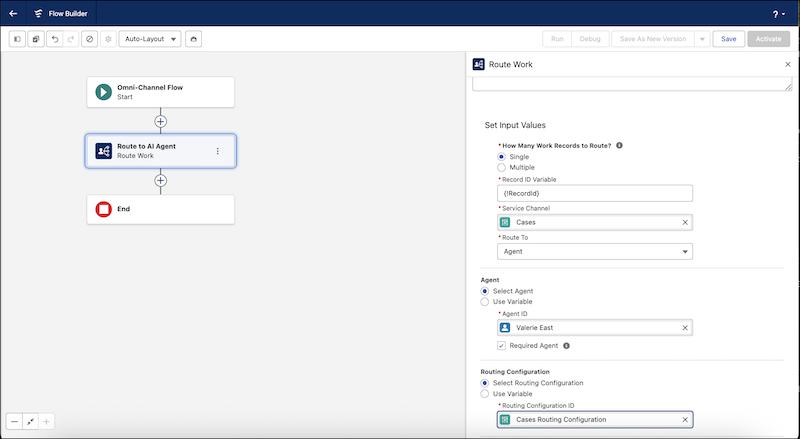
- Make sure to select Required Agent in the Route Work action, and to create a recordId input parameter. If your flow has an input_record variable, ensure that its object type is Case; otherwise, the flow won't work. If you intend to use the same flow across multiple channels, it’s best to include only a recordId input variable to avoid mismatches with the input_record object type and the channel.
Link the Flow to Your Routing Address
After you create your flow, link it to your routing address.
- From Setup, enter Email-to-Case in the Quick Find box, then select Email-to-Case.
- In the Routing Addresses section, click Edit next to the routing address you were viewing earlier.
-
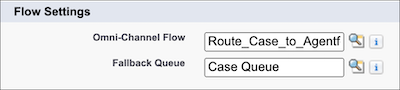
Under Flow Settings, select the Omni-Channel flow that includes routing to your Agentforce
Service agent, and select a fallback queue to receive cases if the flow isn’t available. Note:
Skills-Based and Direct-to-Agent routing must be enabled under the Omni-Channel settings page
in Setup.
- Save your changes.
As an alternative to an Omni-Channel flow, you can simply set the Case Owner of your routing address to the context user for your agent listed under the Agent Details tab in Agents setup, or create a Case Assignment Rule to do the same. This is a quick way to get up and running, but it doesn’t provide the same level of granular control that a flow does.
Configure the Escalation Subagent
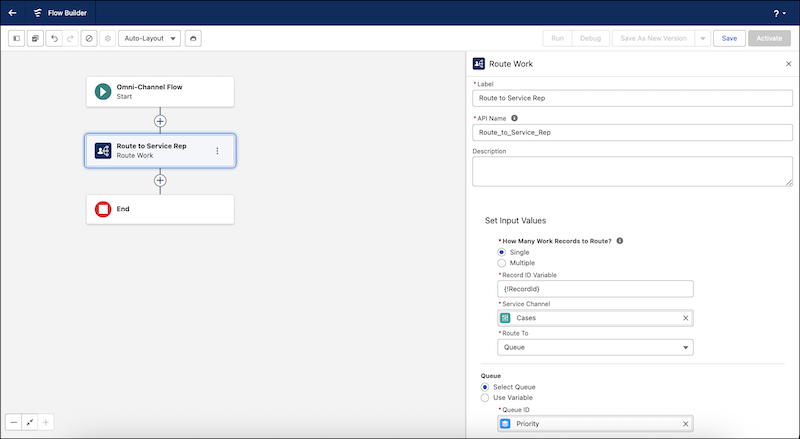
Use the Escalation subagent to route work to a service rep when a customer is frustrated. This is the second flow that you’ll create in the setup process.
- Agentforce Service agents can tell when an end user is frustrated with an interaction, and can use the Escalation subagent to transfer the inbound email to a service rep. Learn more about the Escalation subagent and how to configure it.
- When a case is escalated, your outbound flow is triggered and changes the Case Owner from
the AI service agent to a service rep.
- If you remove the Escalation subagent or choose not to configure a routing flow for escalation, the escalation flow won’t work.
- Agentforce Service agents connected to email don't use the escalation message defined for the agent. When an Agentforce Service agent connected to email escalates a conversation, no response is sent and the agent doesn’t send any more automated emails.
- If using the same flow to route multiple types of records, don’t use an input_record variable in your flow, as this variable must be linked only to one type of record and the flow will not work for other types of records.
