
You are here:
CRM Analytics Encryption
The CRM Analytics Encryption solution enhances security for Salesforce customers by extending encryption capabilities to the data at rest that is stored on the Salesforce file system.
If digital data is in transit, currently being processed, or stored in memory, that data is considered to be in use. By contrast, digital data is considered at rest if it is stored physically in persistent storage but is not currently in use. CRM Analytics Encryption is for encrypting registered datasets in CRM Analytics. To encrypt data at rest and preserve functionality, CRM Analytics Encryption services are built natively into the CRM Analytics platform. The solution applies strong, probabilistic encryption on data stored at rest. Platform encryption is based on the Advanced Encryption Standard (AES) with 256-bit keys using CTR mode for every write.
All operations, including sort and group-by, function the same as without encryption (except for key management functions, as noted in this topic).
How CRM Analytics Encryption Works
As a prerequisite to CRM Analytics Encryption, you must be approved by the CRM Analytics Encryption Product Manager. Your org must have a Shield Platform Encryption tenant secret. (CRM Analytics Encryption uses PE key management, so it’s not necessary to encrypt objects and fields in core Salesforce.)
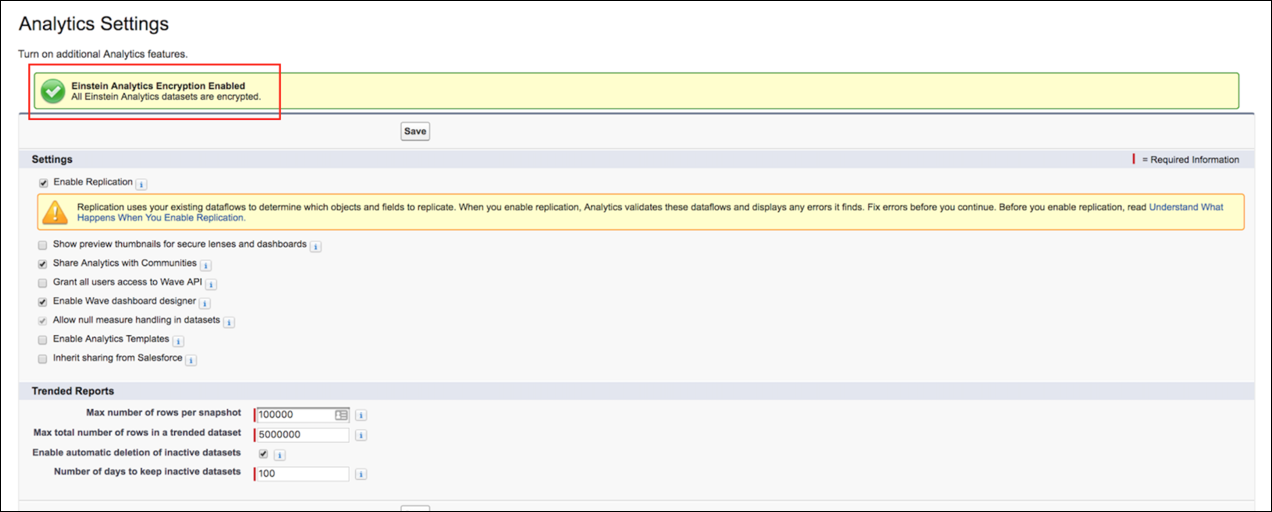
When using CRM Analytics with your encryption-enabled instance, data read from and written to disk is automatically encrypted with the unique key for your account. For more information about the encryption technology, refer to the Shield Platform Encryption Architecture white paper. To verify that encryption is enabled, go to the Analytics Settings page in the Setup UI.
For CRM Analytics Encryption to function properly, you must define IP ranges for the Analytics Cloud Integration and Analytics Cloud Security user profiles as documented in Best Practices: Manage Integration and Security Users in CRM Analytics. Also, add designated Salesforce IPs to your allowlist, Salesforce IP Addresses and Domains to Allow.
Features
Key export, Bring Your Own Key, key rotation, key revocation, and key import are available.
All CRM Analytics features are supported, with the following exceptions:
- Pre-existing data is not encrypted.
- Data that was in CRM Analytics before encryption was enabled is not encrypted.
- If pre-existing data is imported from Salesforce objects through the dataflow, the data becomes encrypted on the next dataflow run.
- Other pre-existing data (such as CSV data) must be reimported to become encrypted.
- Although pre-existing data is not encrypted, it is still accessible and fully functional in its unencrypted state when encryption is enabled.
Frequently Asked Questions
Is data encrypted in transit? Yes. However, encryption in transit is different from encryption at rest. This feature covers encryption at rest.
Can CRM Analytics bring in data encrypted with Shield Platform Encryption? Yes. CRM Analytics reads platform encrypted data in the same way that any user reads platform encrypted data. The data is then written and encrypted in CRM Analytics. It is not required that data be encrypted with Shield Platform Encryption to be encrypted in CRM Analytics. It’s only required that a Tenant Secret exists for the org.
Can I mask my data? No. Masking data is not currently available and it does not fall under the CRM Analytics scope.
Are the keys different for Shield Platform Encryption and CRM Analytics Encryption? Yes, although Shield and CRM Analytics use the same key management technology, they use different keys.
Do mobile dashboards still work with encryption? Yes. All CRM Analytics functionality, including support for mobile devices, works with encryption enabled. All data stored on mobile (mainly JSON code and thumbnails) is AES 256 encrypted.
Is there any impact on application performance? The CRM Analytics Encryption solution is designed to have at most a minimal performance impact on your CRM Analytics application experience.
