
You are here:
Sales Analytics Team Activities Dashboard
See what your team’s been doing to keep on top of opportunities. Look at their total, completed, and overdue tasks and review each member’s calls, events, emails, and tasks.

Default Behavior and Recommended Options
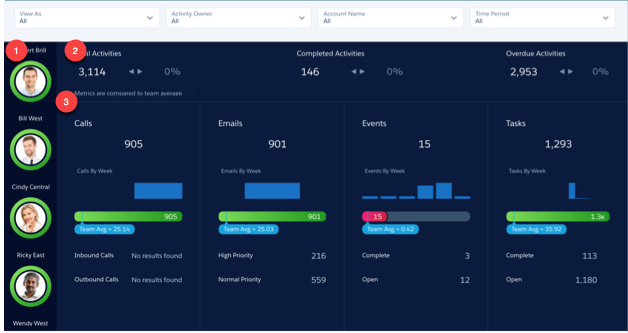
Measure team and individual activity based on Salesforce tasks and events data. Start by looking at total, completed, and overdue tasks for your entire team. Select team members in the panel on the left (1) to see their individual activities and review their calls, events, emails, and tasks. Also see how their level of activity compares to the team average.
Wizard and Other Setup Options
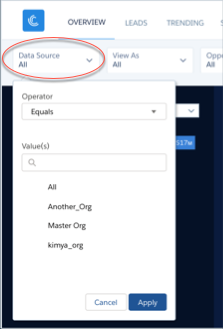
View As filter. If Salesforce is set up to use the Salesforce Forecasting feature in Sales Cloud, the filter shows forecast usernames. If your org doesn’t use forecasting, filter shows role developer names. In either case, pipe rolls up to the selected user. If your org doesn’t use Salesforce role hierarchy, this filter does not appear.
Datasets Used
Activities.
KPI Calculations
Top Section (2)
- Total Activities. Total number of activities with due date in the selected period.
- Total Activities comparison. (Total activities for selected user - Total activities) / Total activities.
- Completed Activities. Total number of activities marked as complete based on due date in the selected period. If the event date is in the past, events are marked as complete.
- Completed Activities comparison. Completed activities for the selected user - Completed activities total / Completed activities total.
- Overdue Activities. Total count of any activity that is overdue. Includes tasks not marked as complete with due dates are in the past.
Middle and Lower Sections (3)
- Calls. Number of tasks of type call with due date in selected period.
- Calls by Week. Number of calls per week with due date in selected period.
- Calls vs. Team Avg. Number of calls for selected user compared with average number for team. Team is made up of activity owners who roll up to user selected in View As filter or user selected in Activity Owner filter.
- Inbound Calls. Number of inbound calls based on Call Type field in the standard Tasks object
- Outbound Calls. Number of outbound calls based on Call Type field in the standard Tasks object.
- Emails. Number of tasks of type email with due date in selected period.
- Emails by Week. Number of emails per week with due date in selected period.
- Emails vs. Team Avg. Number of emails for selected user compared with average number for team. Team is made up of activity owners who roll up to user selected in View As filter or user selected in Activity Owner filter.
- High Priority emails. Number of high-priority emails based on standard Tasks object Priority field.
- Normal Priority emails. Number of normal emails based on standard Tasks object Priority field.
- Events. Number of events with due date in selected period.
- Events by Week. Number of events per week with due date in selected period.
- Events vs Team Avg. Number of events for selected user compared with average number for team. Team is made up of activity owners who roll up to user selected in View As filter or user selected in Activity Owner filter.
- Complete events. Number of events marked closed.
- Open events. Number of future events within the selected period.
- Tasks. Number of open tasks due in the selected period, including overdue tasks.
- Tasks by Week. Number of tasks per week with due date in selected period.
- Tasks vs. Team Avg. Number of tasks for selected user compared with average number for team. Team is made up of activity owners who roll up to user selected in View As filter or user selected in Activity Owner filter.
- Complete tasks. Number of tasks marked closed.
- Open tasks. Number of future events in the selected period.
