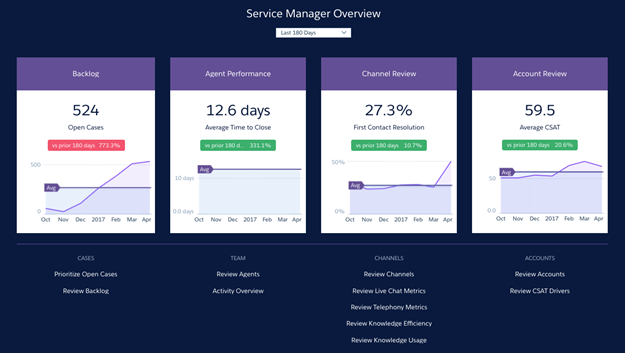
Salesforce created the Service Analytics template to make it
easy for service managers and agents to use data to drive the success of your service business.
Learn the app’s benefits before you create and use the app to explore your Service Cloud
data.
Required Editions
Available in Salesforce Classic and Lightning Experience.
Available with CRM Analytics, which is available for an extra cost in
Enterprise, Performance, and Unlimited Editions. Also available in
Developer Edition.
User Permissions Needed
To use CRM Analytics templated apps:
Use CRM Analytics Templated Apps
To use Service Analytics:
Access Service Cloud Analytics Templates and Apps
To create and manage CRM Analytics apps:
Manage CRM Analytics Templated Apps
Edit CRM Analytics Dataflows
Service Analytics dashboards give you
best-practice key performance indicators (KPIs) about your Salesforce service data in a single
place. We’ve based the app’s dashboards on learnings from many years of helping businesses
manage customer relationships. The goal is to provide the right amount of information at the
right time to help both managers and agents make the right decision.
Service managers get a complete view of service customer data that includes trending as well as
historical and peer benchmarks. Agents can quickly view a snapshot of each case and customer to
help them make quick decisions about their next customer interactions.
We’ve done a lot of the hard work: Our team has built complex queries, formulas, and ratios
that draw from your service and sales data and assembled them into easy-to-read visualizations.
You create the app: using a built-in configurator, answer a few questions about the data and
fields you want to see, and CRM Analytics takes care of the rest. When you’ve created the app,
use its prebuilt datasets and dashboards to explore Service Cloud data from any device that
supports CRM Analytics.
You get actionable insights fast from your data using the intuitive CRM Analytics interface.
And you can drill deeper into key aspects of your business by customizing Service Analytics
around your needs.
Note
Your organization can use Service Analytics without CRM Analytics platform by purchasing a
Service Analytics license. A Service Analytics license is included with the CRM Analytics
platform license.
Did this article solve your issue?
Let us know so we can improve!
Loading
Salesforce Help | Article
Cookie Consent Manager
General Information
Required Cookies
Functional Cookies
Advertising Cookies
General Information
We use three kinds of cookies on our websites: required, functional, and advertising. You can choose whether functional and advertising cookies apply. Click on the different cookie categories to find out more about each category and to change the default settings.
Privacy Statement
Required Cookies
Always Active
Required cookies are necessary for basic website functionality. Some examples include: session cookies needed to transmit the website, authentication cookies, and security cookies.
Functional Cookies
Functional cookies enhance functions, performance, and services on the website. Some examples include: cookies used to analyze site traffic, cookies used for market research, and cookies used to display advertising that is not directed to a particular individual.
Advertising Cookies
Advertising cookies track activity across websites in order to understand a viewer’s interests, and direct them specific marketing. Some examples include: cookies used for remarketing, or interest-based advertising.