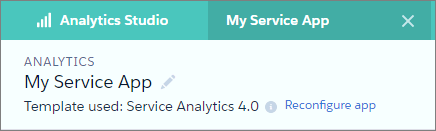
To restore deleted or altered dashboards or change wizard settings, reconfigure an
existing version of Service Analytics.
Required Editions
User Permissions
Needed
To create and manage CRM Analytics apps:
Manage CRM Analytics Templated Apps
Edit CRM Analytics Dataflows
Important Important. Reconfiguring your app gets rid of dashboard customizations,
including fields or objects added to the dataflow. It also deletes actions you enable, or
changes to security settings and dashboard colors and labels. If you’ve made any
customizations, save copies of your dataflow definition file or dashboards. Then copy them
into your reconfigured app.
Open the app landing page. If you see Upgrade instead of
Reconfigure, you need to upgrade to the new version of the app
before you can use the reconfigure feature. See Upgrade the Service Analytics App.
Click the Reconfigure app link.
Review the next screen carefully. It warns you that reconfiguring overwrites
customizations, including changes or additions you’ve made to your app. If you’re
comfortable overwriting customizations, check the box and click
Continue. If not, click Back or the
X in the upper right corner.
At the end of the process, you’re asked if it’s OK to reconfigure your app. This gives
you one more chance to make sure you want to overwrite customizations. If you are, click
OK. Service Analytics creates a new version of your app.
Did this article solve your issue?
Let us know so we can improve!
Loading
Salesforce Help | Article
Cookie Consent Manager
General Information
Required Cookies
Functional Cookies
Advertising Cookies
General Information
We use three kinds of cookies on our websites: required, functional, and advertising. You can choose whether functional and advertising cookies apply. Click on the different cookie categories to find out more about each category and to change the default settings.
Privacy Statement
Required Cookies
Always Active
Required cookies are necessary for basic website functionality. Some examples include: session cookies needed to transmit the website, authentication cookies, and security cookies.
Functional Cookies
Functional cookies enhance functions, performance, and services on the website. Some examples include: cookies used to analyze site traffic, cookies used for market research, and cookies used to display advertising that is not directed to a particular individual.
Advertising Cookies
Advertising cookies track activity across websites in order to understand a viewer’s interests, and direct them specific marketing. Some examples include: cookies used for remarketing, or interest-based advertising.