
You are here:
Set Initial Global Filters in the Dashboard
If the CRM Analytics dashboard contains global filters, you can set the initial filters that are applied when the dashboard first opens. If a global filter is unlocked, the dashboard viewer can change the filter while viewing the dashboard. Global filters apply to all queries in the dashboard unless a query is configured to ignore these filters.
-
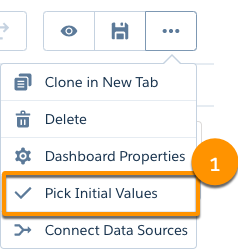
While editing a dashboard, select a global filter, and then click Pick
Initial Values (1).
- Choose the initial filter value for each global filter, then click Apply.
- Click Done, and save the dashboard.
Did this article solve your issue?
Let us know so we can improve!
