Loading
Scheduled maintenance for Salesforce HelpRead More
CRM Analytics
Table of Contents
Select Filters

          No results
          No results
          Here are some search tips

          Check the spelling of your keywords.
          Use more general search terms.
          Select fewer filters to broaden your search.

          Search all of Salesforce Help
          Create Tooltips for Repeater Widgets

          Create Tooltips for Repeater Widgets

          For a quick review of related data while reviewing metrics in a scrollable layout, add tooltips to a repeater. You can design a separate tooltip for text, numbers, images, and bullet, gauge, polar gauge, or flat gauge charts in the repeater. The options available vary depending on the widget type. For example, on a number widget, you can choose a default or custom tooltip, while you can include custom text, data point details, and visualizations in a chart widget’s tooltip.
          Required Editions

          User Permissions Needed
          To customize dashboard widgets: Create and Edit Analytics Dashboards
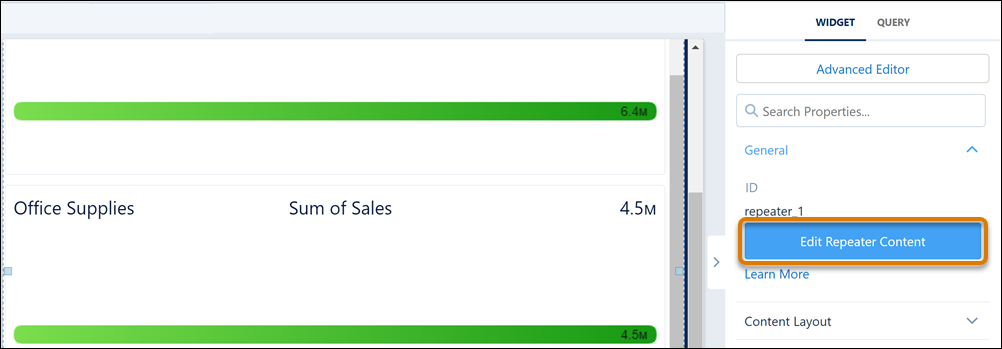
          1. In the dashboard designer, with the repeater widget selected, click Edit Repeater Content.
            Editing a repeater widget and query
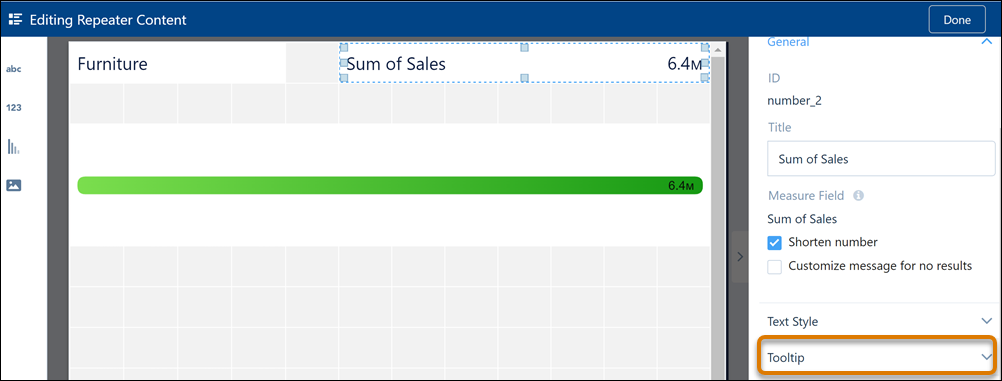
          2. In the repeater widget, select the widget to which you want to add the tooltip, and then click Tooltip.
            Create a repeater widget tooltip
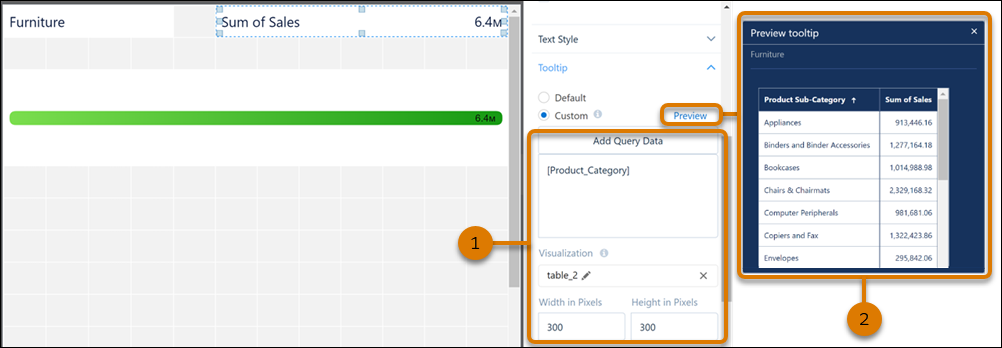
          3. Set tooltip content and its size (1). Preview the tooltip when done (2).
            Set tooltip content for a repeater widget and preview contents
          4. Use a similar process to create tooltips for other widgets in the repeater widget.
          5. Preview your changes and save your dashboard.
           
          Loading
          Salesforce Help | Article