
You are here:
Add Selection-Based Filter Widgets to Enable Users to Filter the Results
Users viewing the dashboard can make selections in these types of widgets, which filter the results of other faceted widgets. Selection-based filter widgets give users the ability to slice and dice the data to view results from different angles. For example, the dashboard viewer can select a region in a list widget to focus the dashboard results on a specific sales location. Unlike with a filter defined by a query, the viewer can filter the results differently (by making another selection) or remove the filter altogether.
A selection-based filter is different from a query. When a selection is made, all values in the original query still appear in the widget, just with particular values highlighted. However, a query modifies the widget, reducing the number of results that appear in the widget. A global filter is a query that can be applied to multiple queries in a dashboard.
The following illustration shows the difference between a selection and a query on the same data.
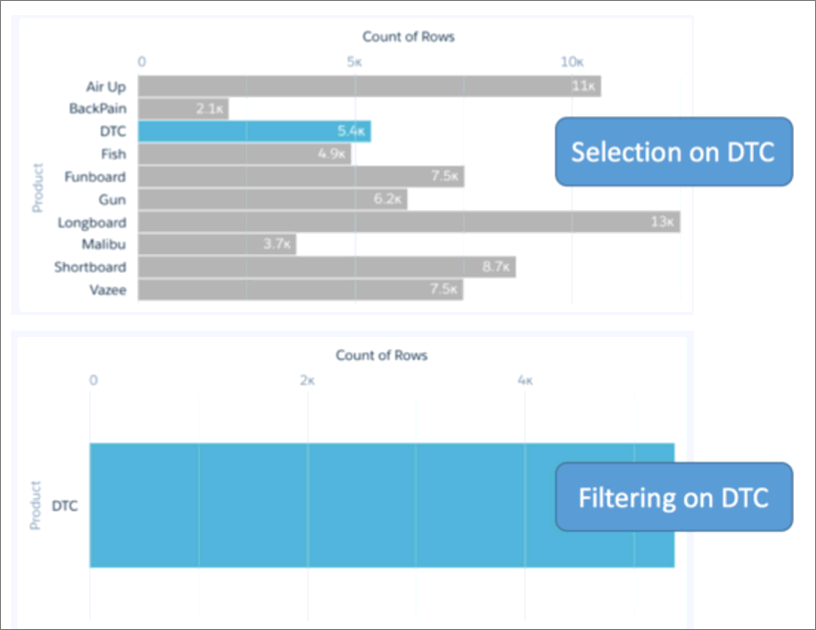
You can create different types of selection-based filter widgets based on measure, date, and dimension fields. You can also set an initial selection for each of them. For example, when the viewer opens the dashboard, the date widget can select last year, by default, to show dashboard results for last year only.
Selection-based filter widgets can be styled using pill or combobox styling to easily mix-and-match selection-based filters and global filters on the same dashboard.
- Add a Date Widget to Filter Dashboard Results Based on a Date
A date filter widget allows dashboard viewers to filter the CRM Analytics dashboard results based on a selected date range. The range can use relative dates based on UTC (like 2 years ago), absolute dates (like 1/15/2016), or presets (like Current Fiscal Year To Date). For example, you can add a date widget to filter support cases, showing only cases that closed this month or last month. - Add a List Widget to Filter Dashboard Results Based on a Dimension
A list filter widget allows dashboard viewers to filter the CRM Analytics dashboard results based on a dimension. For example, a list widget can filter results based on a particular case status or region. - Add a Range Widget to Filter Dashboard Results Based on a Measure
A range widget allows dashboard viewers to filter the CRM Analytics dashboard results based on a range of values for a measure. For example, a range widget can show only opportunities with amounts between $100,000 and $900,000. - Add a Toggle Widget to Filter Dashboard Results Based on a Dimension
A toggle widget allows dashboard viewers to filter the CRM Analytics dashboard results based on a date or dimension. For example, a toggle widget can show results based on a specific record type.
