
您在此处:
设置复杂的条件格式化
根据小部件属性中的单个参考列,您可以设置条件。但您偶尔需要创建更复杂的条件。要根据数字和表格小部件的多个参考列设置规则,使用 SAQL。
-
在 SAQL 查询中设置条件。定义规则,并将颜色输出到新列。使用十六进制码(例如 #CCCC00)或 RGB 代码(例如,rgb(255,255,255) 或 rgba(255,255,255,0)),指定颜色。
例如,以下查询会在“FormatColor”列中指定规则,并输出每个条件的十六进制颜色代码。
"query": "q = load \"Sample_Superstore_with_Goals\";\n result = group q by 'Segment';\n result = foreach result generate q.'Segment' as 'Segment', sum(q.'Discount') as 'Discount', sum(q.'Profit') as 'Profit', sum(q.'Quantity') as 'Quantity', sum(q.'Sales') as 'Sales', (case when Segment == \"Consumer\" and sum(q.'Discount') >= 1000 then \"#008000\" when Segment == \"Consumer\" and sum(q.'Discount') < 1000 then \"#CCCC00\" when Segment == \"Corporate\" and sum(q.'Discount') >= 500 then \"#008000\" when Segment == \"Corporate\" and sum(q.'Discount') < 500 then \"#CCCC00\" when Segment == \"Home Office\" and sum(q.'Discount') >= 200 then \"#008000\" when Segment == \"Home Office\" and sum(q.'Discount') < 200 then \"#CCCC00\" else \"#000000\" end) as 'FormatColor';\n result = order result by ('Sales' desc);\n result = limit result 2000;", -
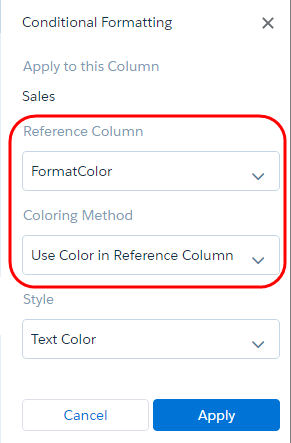
要将文本颜色应用到销售额表列,在“参考列”小部件属性中选择新颜色列(“FormatColor”),并在“颜色标记方法”选项中选择在引用列中使用颜色。
根据用于确定“FormatColor”参考列中颜色的逻辑,以下示例对销售表列中的文本进行有条件的标记。
本文章是否解决您的问题?
请与我们共享您的想法,以便我们进行改进!
