
You are here:
Bulk Actions Example
You want to add the “Create Opportunities” option in a table widget’s action menu. This action must create an opportunity for each account shown in a table widget.
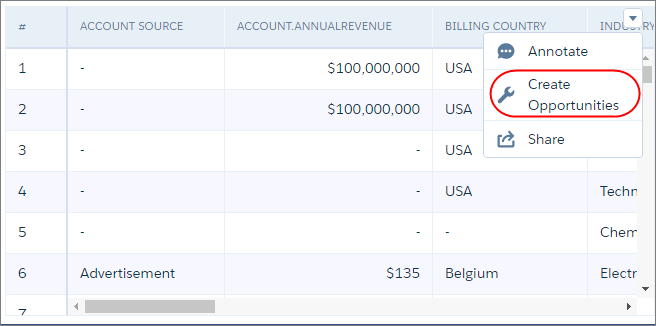

Note This widget-level action menu is different from the record-level action menu that you
can access from a record.
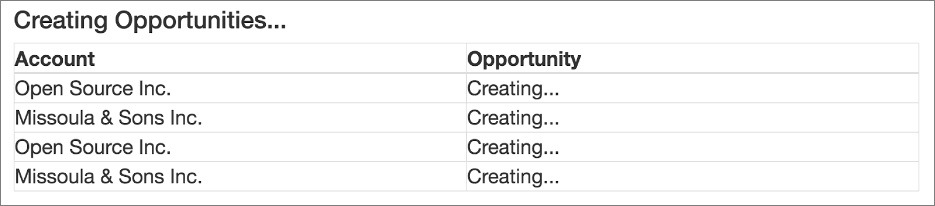
To keep the user informed of what is happening, the action must also display a Visualforce page that shows the progress of the following tasks.
- The Visualforce page retrieves a list of accounts from the SAQL query used
to populate the table widget. If the table widget’s results were previously filtered
because of selections in other dashboard widgets, only the filtered records are
returned.

- The Visualforce page creates an opportunity for each retrieved
account.
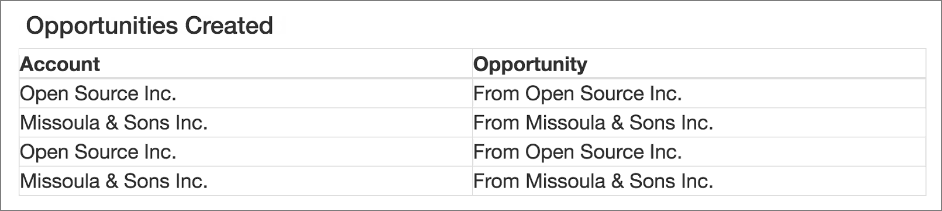
- The Visualforce page shows the opportunity created for each account.
To implement this bulk action, perform the following tasks.
- Define Action Behavior with Apex Controller Class and Methods
Define an Apex controller class and methods that generate a list of accounts shown in the table widget, create an opportunity for each account, and return the progress of each task. - Create a Visualforce Page That Executes the Action
The Visualforce page calls the methods defined in the Apex controller class to invoke the action and provide a status on the tasks. - Assign Bulk Action to Table Widget
Configure the table widget properties to expose the bulk action defined in the Visualforce page.
Did this article solve your issue?
Let us know so we can improve!
