
You are here:
Create a Visualforce Page That Executes the Action
The Visualforce page calls the methods defined in the Apex controller class to invoke the action and provide a status on the tasks.
- From setup, enter Visualforce in the Quick Find box.
- Select Visualforce Pages.
- Click New.
-
Enter the Visualforce page label and description.
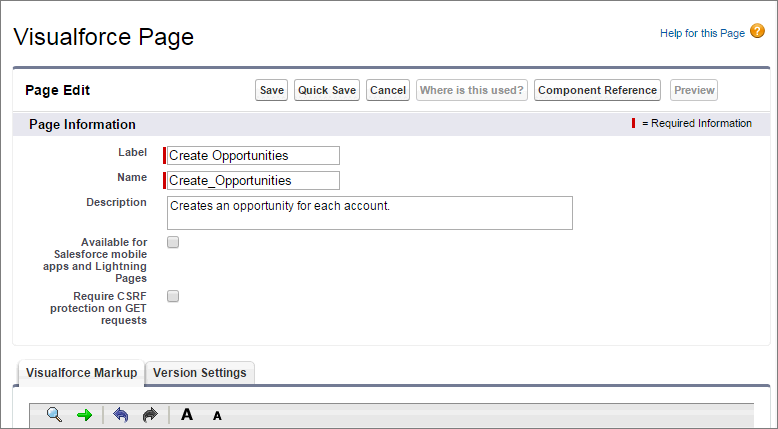
-
Replace the existing markup with this code.
<apex:page controller="CreateOpportunitiesController" action="{!init}" showheader="false" sidebar="false" standardStylesheets="false" title="Create Opportunities" > <apex:stylesheet value="https://maxcdn.bootstrapcdn.com/bootstrap/3.3.6/css/bootstrap.min.css"/> /* Use jQuery to process API calls */ <apex:includeScript value="https://code.jquery.com/jquery-3.1.0.min.js"/> <style> th { width: 50%; } h4 { font-size: 24px; } table { font-size: 20px; width: 100%; } </style> <div class="container-fluid"> /* Add HTML table to the Visualforce page that shows the accounts, the opportunity creation status, and then finally the new opportunity name */ <h4 id="message">Querying Accounts...</h4> <table name="results" id="results" data-role="table" class="table-bordered table-striped table-responsive"> <thead><tr><th>Account</th><th>Opportunity</th></tr></thead> <tbody></tbody> </table> </div> <script> $(function() { $.ajaxSetup({ headers: {"Authorization": 'Bearer {!$Api.Session_ID}'} }); setTimeout(executeQuery, 1000); }); /* Executes the SAQL query and displays the resulting accounts. Note: Account.Name and AccountId referenced below refer to the dataset field names. Update them to match your dataset fields. */ function executeQuery() { // Replace this with the actual SAQL query needed to fetch data for this page var query = {}; query.statements = "{!JSENCODE(query)}"; var queryObj = {query: query.statements}; $.ajax({ type: 'POST', url: '/services/data/v39.0/wave/query', data: JSON.stringify(queryObj), contentType: 'application/json', success: function(data) { $('#message').html('Creating Opportunities...'); var record = null; var row = null; $('#results tbody').empty(); for (var i = 0; i < data.results.records.length; i++) { record = data.results.records[i]; row = $('<tr>'); row.append($('<td>').html(record['Account.Name'])); row.append($('<td class="' + record.AccountId + '">').html('Creating...')); $('#results tbody').append(row); } setTimeout(function() {createOpportunities(data.results.records);}, 1000); }, }); } /* Calls the Apex controller method that creates opportunities for each account and returns the opportunity name for each account to the HTML table. */ function createOpportunities(accountRecords) { CreateOpportunitiesController.create(accountRecords, function(result, event) { console.log(result); if (event.status) { for (var i = 0; i < accountRecords.length; i++) { $('td.' + accountRecords[i].AccountId).html(result[accountRecords[i].AccountId]); } $('#message').html(accountRecords.length + ' Opportunities Created'); } else { $('#message').html('Error: ' + event.message); } }); } </script> </apex:page> - Click Save.
Did this article solve your issue?
Let us know so we can improve!
