
You are here:
Take Action on Multiple Records with Mass Action Links in CRM Analytics
Mass action links in CRM Analytics let you take advantage of Salesforce mass quick actions by performing an action on a list of up to 100 Salesforce records.
With mass quick action links, you can use quick actions that were added to Salesforce objects List View layouts, directly from Analytics dashboards. You can perform a mass action on up to 100 records at once, using Analytics filtering to target the list of records you want to perform the action on.
Access mass quick actions by clicking the mass action link on the dashboard.
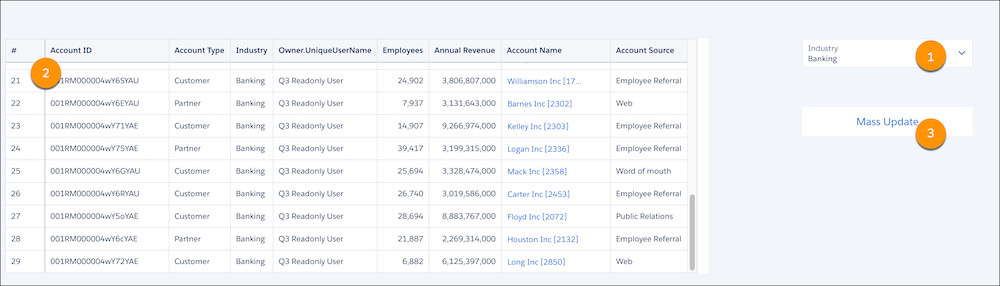
- Filter your records.
- View the list of records in the table. In this example, there are 29 accounts of the industry type banking.
- To perform the mass quick action on all 29 account records, click Mass Update.
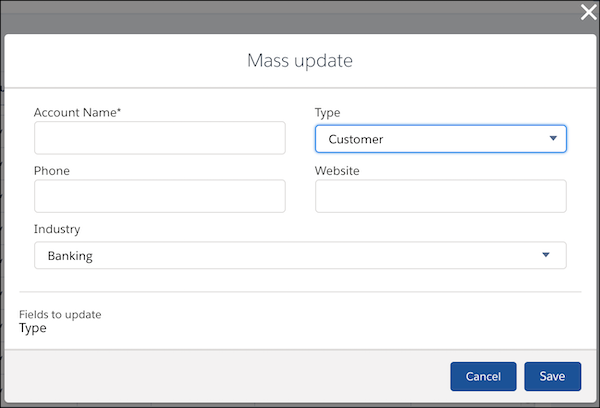
Each mass action has a custom window that opens when the link is clicked. The window is the same as you see when you take the mass action in the record list view of Lightning Experience. As you fill in the fields, the Fields to update section updates. When you have the action completed, click Save.
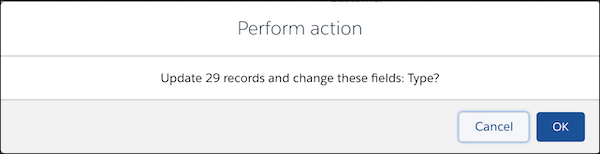
The mass action confirmation dialog shows how many records the action is performed on and which fields are updated. If more than 100 records are in the list, the dialog informs you that only 100 records are updated. Click OK to perform the action.

