
You are here:
Considerations When Opening a Dashboard View
There are special cases when a view doesn’t open or isn’t applied completely.
If you open a dashboard that has external selections or filters, the default view isn’t applied. If you open a view, the external selections and filters are removed. If steps or widgets in your dashboard have errors, views aren’t applied properly.
A dashboard maintains existing selections and filters when you use a link or navigation widget to switch between pages of a multi-page dashboard. If you use a saved view to switch between pages, any previous selections and filters are removed and the state from the saved view is applied.
If you open a view and CRM Analytics can’t display all the criteria defined in a view, it displays what it can and shows a warning next to the view name.
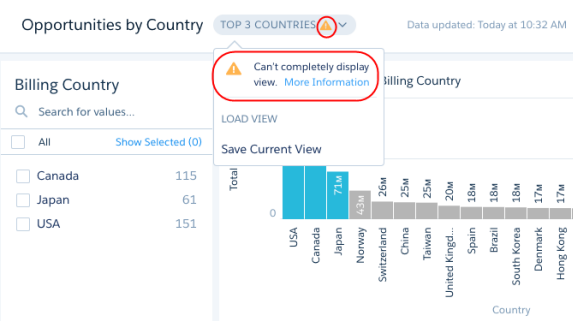
CRM Analytics can’t display all view criteria for these cases.
- CRM Analytics ignores selections and filters that no longer apply to the dashboard. For example, CRM Analytics ignores references to datasets, fields, field values, and steps that no longer exist. These issues arise when the dashboard or data changes but the view isn’t updated.
- If a view includes a selection on a widget that doesn’t exist in a layout, CRM Analytics ignores the selection. A view applies to all layouts defined in the dashboard.
- If a view is created based on a dashboard page that has since been deleted, CRM Analytics shows the view based on the first page defined for the dashboard.
