
You are here:
Explore Insights for a Variable
Explore how an explanatory variable is related to your model’s goal.

When you create a model version or open a model, Einstein shows you a list of insights, starting with the most statistically significant ones, which are the primary insights in your model. They are descriptive insights that help you explore, at an overview level, what factors contribute to the outcome. These descriptive insights are similar to what you see in business intelligence (BI), visualization, and reporting products.
This initial, unfiltered list contains insights across all your data. To focus your exploration and delve deeper into insights, select any variable from the Variables panel. It's common to begin with variables that show higher correlations to the outcome.
Keep in mind that correlation is not causation. Correlation merely describes the strength of association between variables, not whether they causally affect each other. It’s up to you to determine whether a correlation indicates anything more than just a statistical link.
- Open a Model.
-
In the Variables panel, select a variable you want to investigate.
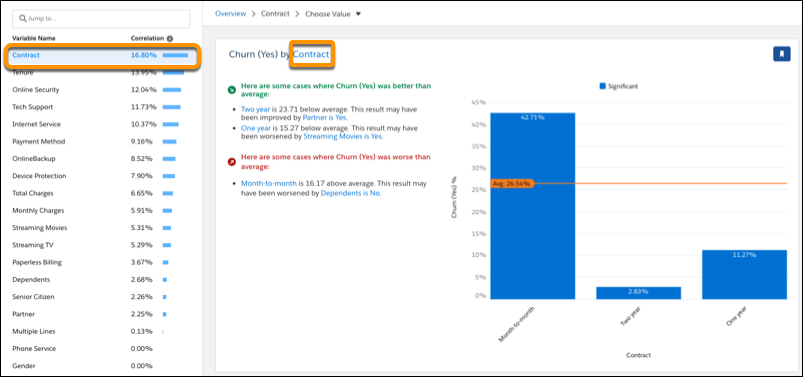
- The insights list shows insights that are associated with the selected variable only.
- The filter selector shows the variable you're investigating.

- The first insight in the list shows how the selected variable is associated with the
outcome. It represents a summary of all values associated with the variable.
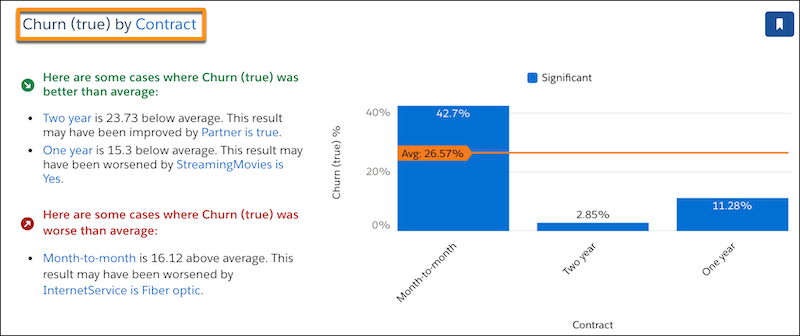
- Subsequent insights in the list show how combinations of values and conditions are
associated with the outcome.

- Scroll through the list of descriptive insights and examine any that interest you.
- Explore a First-Order Insight for a Numeric Variable
When you select a numeric explanatory variable, Einstein displays a bar chart with the numeric variable along the horizontal axis. - Explore a First-Order Insight for a Text Variable
When you select a text (categorical) variable, Einstein displays a bar chart with the text variable along the horizontal axis. - Explore a First-Order Insight for a Date Variable
When you select a date variable, Einstein displays a chart with the date variable along the horizontal axis. - Explore a Second-Order Insight
A second-order insight shows how the combination of two explanatory variables explains variation in the outcome variable. In second-order analysis, the combined impact of both variables together on the outcome is sometimes called the interaction effect.
