
You are here:
View a Model
You can view a model deployed in your org.
-
View a Prediction Definition in Model
Manager.
The Overview tab displays one or more models associated with the selected prediction definition.
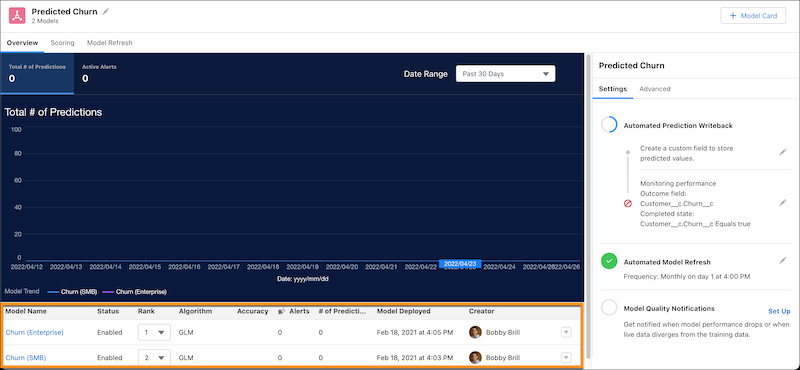
Each row represents a separately deployed model. For example, under the same prediction definition, you can see different models for different segments. One segment can target won opportunities while another can target lost opportunities.
Column Description Model Name Name of the model. Click to view the model. Status Indicates whether the model is active (Enabled) or not (Disabled). Rank Order in which models are executed under a prediction, with 1 being the first to execute. Only one model is used to score against a record. If a prediction has multiple models, then the model in the sequence with the first matching filter is used to score the record. Algorithm Algorithm used to create this model. See Edit General Settings for a Model. Accuracy Logistic models only. Cumulative total accuracy for this model. RMSE Linear models only. RMSE (Root Mean Squared Error) for this model, which is the same as the square root of the models MSE (Mean Squared Error). RMSE measures the difference between the values predicted by the model and the observed (actual) values. You can think of this value as the “standard deviation of errors.” Alerts Number of alerts associated with the model. See Configure Model Quality Notifications. # of Predictions Total number of predictions made by this model within the org. Model Deployed Date and time when the model was deployed. Creator User who created the model. -
To view details for a particular model, click its Model Name, or
choose View Model Details from the dropdown.
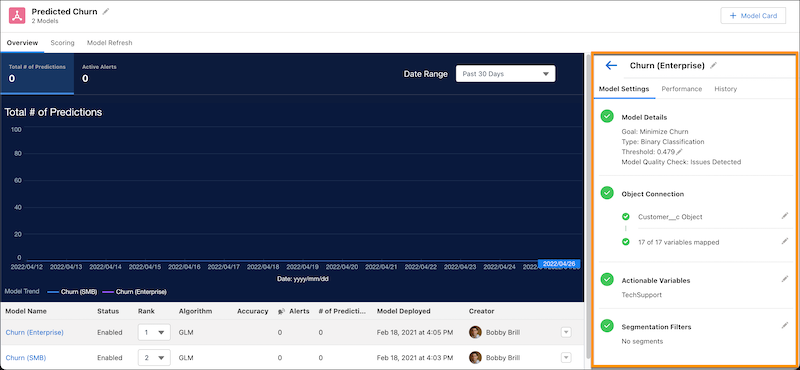
- Model Settings tab: Displays the model threshold, actionable variables, field mappings, and segmentation filters.
- Performance tab: Displays performance metrics when performance is configured for the model.
- History tab: Displays the model’s update history.
Did this article solve your issue?
Let us know so we can improve!
