
You are here:
Start Model Manager
Launch Model Manager from the Analytics panel in CRM Analytics Studio.
- In the Analytics panel, click the Model Manager tab.
-
Review the statistics that summarize all deployed predictions definitions within your
org.
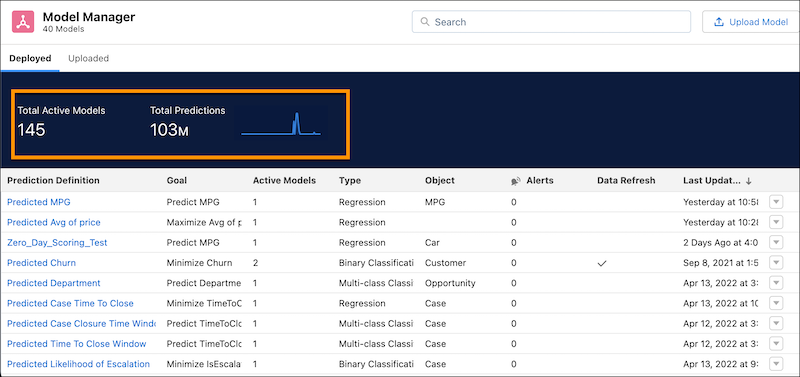
Column Description Active/Total Models - Total number of deployed models that are active within the org. An active model is a valid model that can be used to get predictions.
- Total number of deployed models (active + inactive) within the org. A model becomes inactive manually (see Enable or Disable a Model) or if an internal error occurred during model deployment.
Total Predictions Total number of predictions made within the org. Applies only to models that use automated prediction fields. The chart shows the daily number of predictions made within the past ten days. -
Scroll the list of prediction definitions. Each row represents a prediction definition
that contains one or more models.
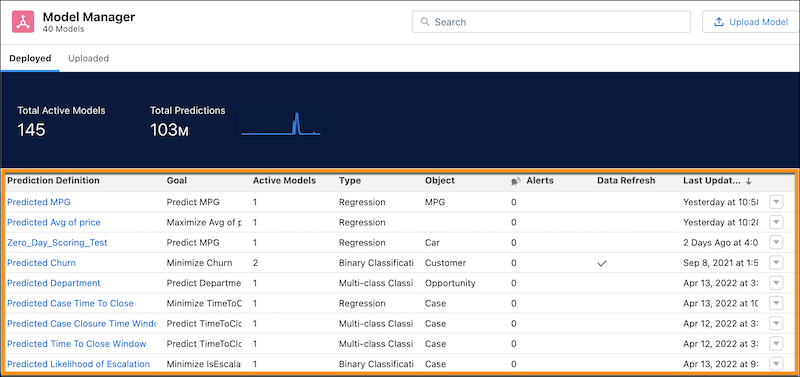
Column Description Prediction Definition Name of the prediction definition. Goal Outcome variable for the prediction definition, and whether to minimize or maximize the outcome. Active Models Number of active models associated with the prediction definition. Type - Regression predictions are associated with number fields (numeric use cases).
- Binary Classification predictions are associated with text fields (classification use cases) with two possible outcomes.
- Multi-class Classification predictions are associated with text fields with 3–10 possible outcomes.
Object Salesforce object associated with the prediction definition. Alerts Number of data alerts associated with the prediction definition. Data Refresh Indicates whether scheduled automatic refresh is enabled for the prediction definition. Last Update Timestamp of the last update to the prediction definition.
Did this article solve your issue?
Let us know so we can improve!
