
You are here:
View a Prediction Definition
Manage a prediction definition and its associated models.
To view a prediction definition:
- Open Model Manager.
-
In the prediction definitions list, click the name of the prediction definition you
want to view, or click View in the dropdown.
For the selected prediction definition, you see:
- a graph that shows a timeline of the total number of predictions, along with a date range selector
- a list of models associated with this prediction definition
- settings panel showing current settings that you can configure, such as automated prediction writeback, automated model refresh, and model quality notifications.
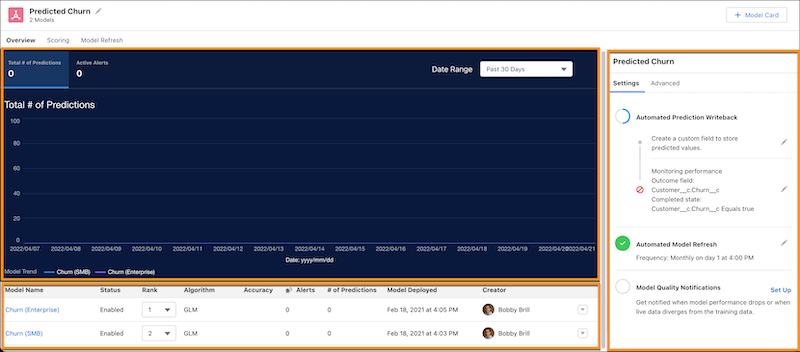
To set up performance monitoring, see Configure Performance Monitoring for a Prediction Definition.
-
To view developer settings, click the Advanced tab.
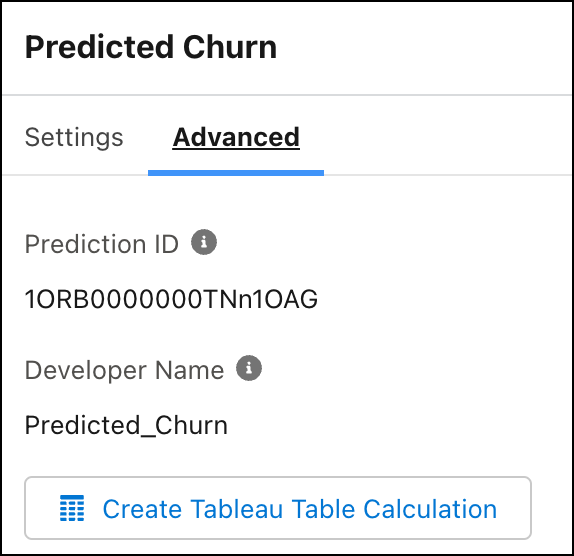
Column Description Prediction ID Unique, system-assigned ID for this prediction definition. The Prediction ID appears at the end of the URL after you open a prediction definition. Developer Name Name of the developer associated with this prediction definition. Create Tableau Table Calculation Click to create a table calculation snippet for Tableau. See Get Predictions in Tableau Calculated Fields.
Did this article solve your issue?
Let us know so we can improve!
