
You are here:
Cross-Validation Tab for Binary Classification Use Cases
To test a model’s ability to make predictions, Einstein Discovery uses k-fold cross-validation, a process that reduces sampling bias when validating a model. This tab summarizes the results of the cross-validation process for this model, as well as some of the underlying computational details.

Navigate to the Cross Validation Tab
In Performance, click Model Evaluation, then Cross Validation.
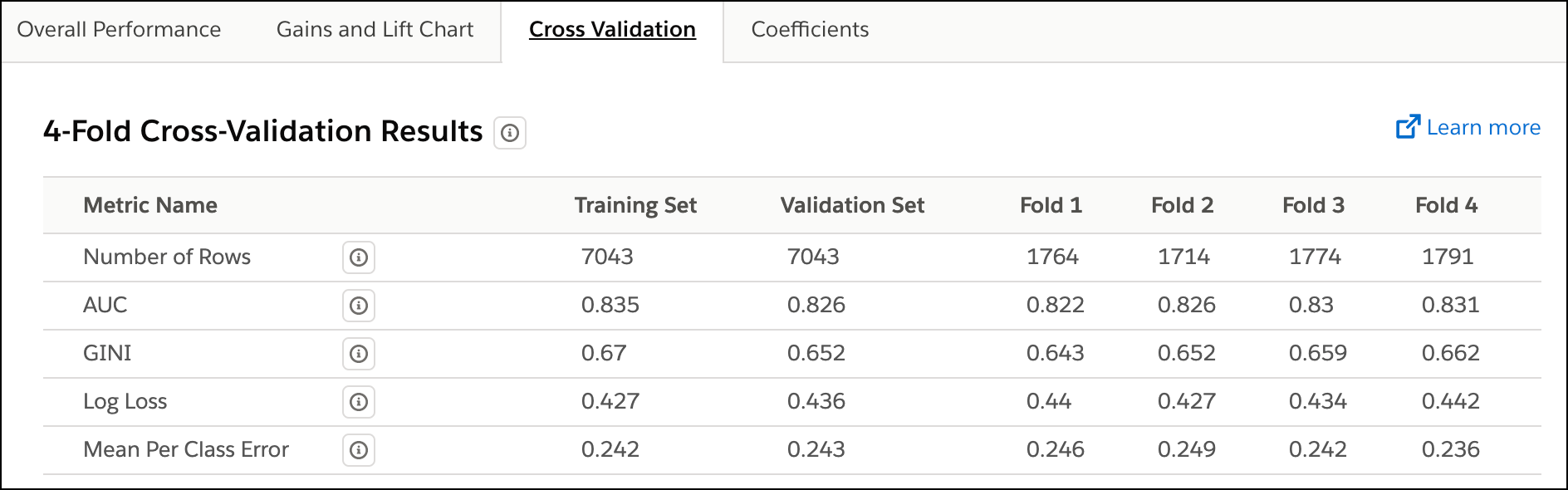
Columns on the Cross Validation Tab
The following table describes the columns in the Cross Validation tab.
| Column Name | Description |
|---|---|
| Metric Name | Name of the metric. |
| Training Set | Metrics for the set of observations in the CRM Analytics dataset that Einstein Discovery uses to train the model. |
| Validation Set | Metrics for the set of observations in the CRM Analytics dataset that Einstein Discovery uses to validate the predictions generated by the trained model. |
| Fold #1 | Metrics for the first fold. |
| Fold #2 | Metrics for the second fold. |
| Fold #3 | Metrics for the third fold. |
| Fold #4 | Metrics for the fourth fold. |
Metrics on the Cross Validation Tab
The following table describes the metrics in the Cross Validation tab.
| Metric Name | Description |
|---|---|
| Number of Rows | Total number of observations. The meaning of a value varies per column.
|
| AUC | Area Under the Curve. Represents the rate of correct classification by a logistic model. AUC is the most reasonable metric to use for classification use cases. Range:
|
| GINI | GINI Index. Quantifies how close the obtained model performs to a theoretically best possible model. Range:
|
| Log Loss | Logarithmic Loss. Measures model performance on a scale of 0–1, where 0 represents a perfect model (the predicted probability correctly matches actual observations 100%). The less the predicted probability correctly matches actual observations (lower performance), the higher the log loss. Log loss considers uncertainty in model performance. |
| Mean Per Class Error | Measures how often the predictions are wrong. Lower values mean the predictions are wrong less often, and therefore the model is better at making predictions. |
Model Validation Methodology
Einstein Discovery conducts k-fold cross-validation (k=4) on your model. This process involves the following steps:
- Randomly divide all the observations in the CRM Analytics dataset into four separate partitions of equal size.
- Conduct four test passes (folds) in which three of the partitions serve
as the training set and one partition serves as the test
set.Note After completing the four test passes, each partition has served one time as the validation set and three times as part of the training set.
- For each fold, compile model metrics.
- Take the average of the four folds for an overall score.
