
You are here:
Model Evaluation Tab for Binary Classification Use Cases
The Model Evaluation tab provides information about a model's performance, gains and lift, cross-validation results, and coefficient values.

Note Einstein Discovery stories are now models. We wish we could snap our fingers to update
the name everywhere, but you can expect to see the previous name in a few places until we
replace it.
Navigate to the Model Evaluation Tab
In Performance, click Model Evaluation.
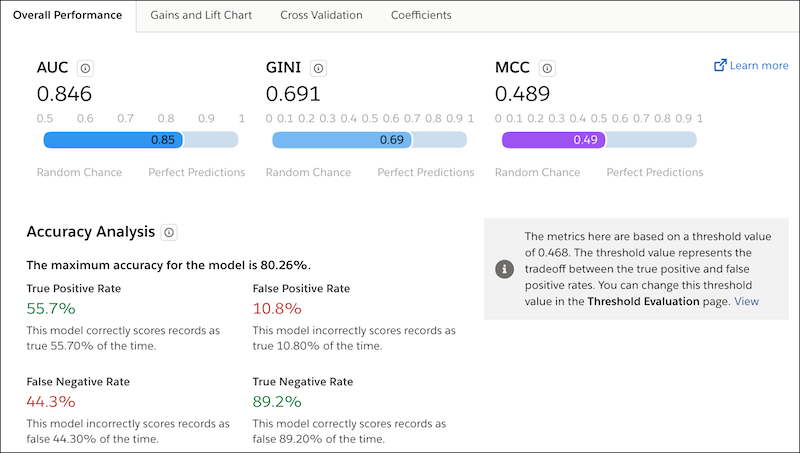
For model evaluation details, click a subtab.
- Overall Performance Tab for Binary Classification Use Cases
The Overall Performance tab shows key summary metrics for model quality. - Gain and Lift Charts for Binary Classification Use Cases
The Gain and Lift charts help you evaluate your model’s ability to predict outcomes and understand the benefit of the model. Using a portion of the data that’s scored and ranked for analysis, the charts measure results obtained with the model compared to random guessing without a model. The greater the gain and the higher the lift, the more effective the model. - Cross-Validation Tab for Binary Classification Use Cases
To test a model’s ability to make predictions, Einstein Discovery uses k-fold cross-validation, a process that reduces sampling bias when validating a model. This tab summarizes the results of the cross-validation process for this model, as well as some of the underlying computational details. - Coefficients Tab for Binary Classification Use Cases
A model uses coefficients to calculate a prediction for a specific observation. You can filter the list of coefficients and also download the data in a CSV file.
Did this article solve your issue?
Let us know so we can improve!
