
You are here:
Display Einstein Predictions Using Automated Prediction Writeback
When automated prediction writeback fields are configured for a prediction definition that outputs a numerical prediction (regression) or score (binary classification), Einstein Discovery can save predictions directly to Salesforce records for use in reports and list views. Configure automated prediction writeback in Model Manager. After deployment, Einstein scores newly created or updated records in the Salesforce object and writes the score to the prediction field. Only the prediction is written, not the reasons for the prediction or the suggested ways in which to improve the prediction.

About Automated Prediction Writeback Fields
Prediction writeback fields are a special type of custom field that only Einstein can write to. Otherwise, an automated prediction writeback field works just like other custom number fields: you can choose which profiles have read access and which page layouts to include the field. In addition, you can add this field to any list view and to any report. The only requirement is that you configure row-level security for prediction fields.
Salesforce Objects and Mapping
To use Automated Prediction Writeback fields:
- Select a Salesforce object, and
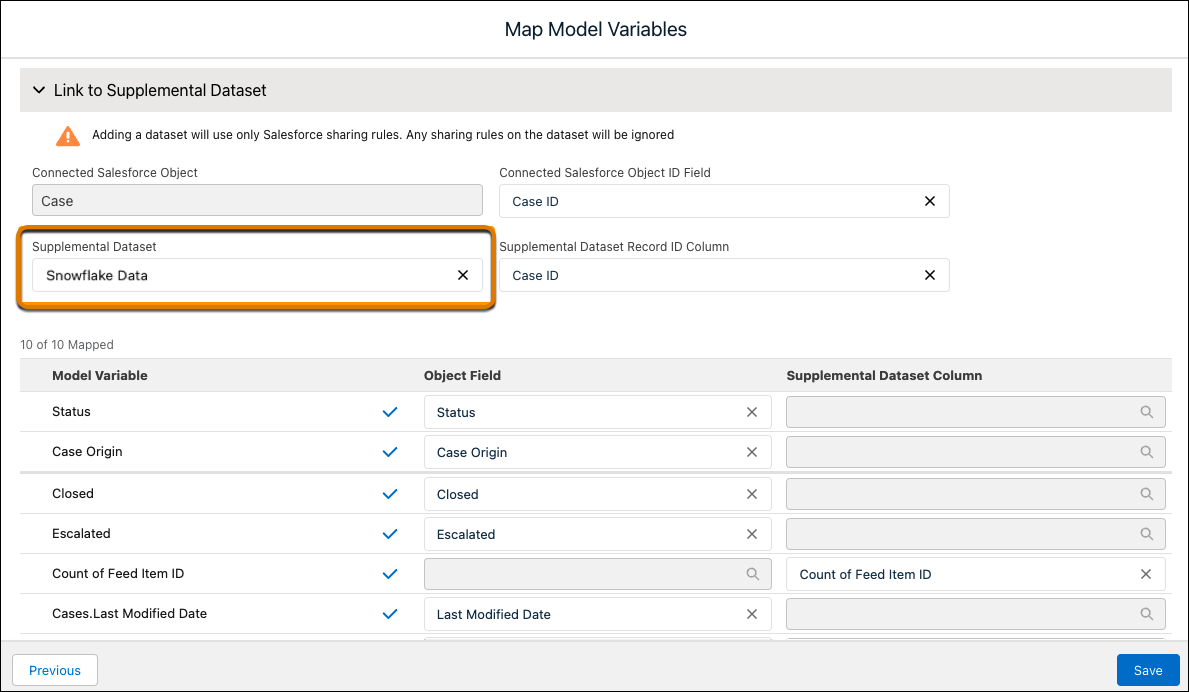
- Map all variables in the model to corresponding fields in the Salesforce
object or a supplemental dataset.
- Salesforce Object Use the Object Field column, which supports any field on that object for which the prediction definition was deployed, or for any parent object.
- Supplemental Dataset Use the Supplemental Dataset
Column to select a column from another dataset or live
data connection.
 Note
Note- To map predictions to live Google BigQuery data, create a live connection to Google BigQuery. For more information and instructions, see Gain Insights on Data Directly in Google BigQuery.
- To map predictions to live Snowflake data, create a live connection to Snowflake. For more information and instructions, see Gain Insights on Data Directly in Snowflake.
Assign Field-Level Security to the Prediction Field (Required)
Before you can see this prediction field in Reports, List Views, or Page Layouts, you must assign field-level security just like you do for other custom fields. For instructions, see Manage Fields for a Specific Object
Assign Predictions to List Views and Custom Report Types
After you have set field-level security, you can add this field to existing custom report types and list views just like you do for other custom fields.
Prediction Values in the Einstein Predictions Panel
The prediction shown in the Einstein Predictions panel on a Lightning record page or Experience Cloud sites page can differ from the prediction shown in the prediction field. The Einstein Predictions panel displays real-time predictions, while the prediction field is updated only if the record is updated or it’s written to by the Get Predictions With Bulk Scoring feature.
View Reasons and Improvements Associated with Predictions
Only the prediction value (or score) is written to the prediction field. If you also want to display the prediction reason and suggested improvements to the predicted outcome, add the Einstein Prediction Lightning component on a Lightning record page. For instructions, see Get Predictions on Lightning Pages.
