
You are here:
Get Predictions in Process Automation Formulas
Use the Einstein Discovery PREDICT function to get predictions in your process automation formulas. Your automation logic can make decisions based on predicted outcomes from deployed Einstein Discovery predictions. For example, in an approval process, a formula can determine whether a predicted outcome meets a threshold required for automatic approval.
PREDICT Function in Process Automation Formulas
The PREDICT function is available when defining formulas associated with:
- Next Best Action
- validation rules
- screen, headless, and invocable flows
- processes (in Process Builder)
- workflow rules
- approval processes
- predefined field values
- field update actions
- default values
To learn more, see Calculate Field Values With Formulas and PREDICT.

Permissions Required to View Predictions and Improvements
To view predictions, users must have the View Einstein Discovery Recommendations permission assigned to their Salesforce account. To learn more, see Assign Einstein Discovery Permission Sets to Users.
Use the PREDICT Function in a Formula
- Create or edit an approval process, flow, process (in Process Builder), workflow rule, or Next Best Action.
-
In the formula builder, under Functions, select Advanced, select PREDICT, and click
Insert Selected Function.
The following example shows the default entry for PREDICT in a formula for an approval process.
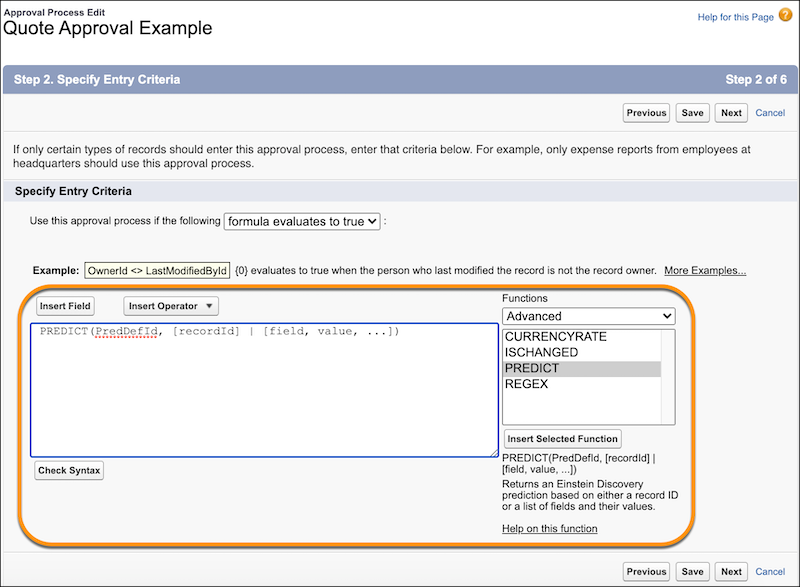
The PREDICT function returns an Einstein Discovery prediction for a record based on the specified record ID or for a list of fields and their values. It uses the following syntax:
PREDICT(PredDefId,
                [recordId] | [field, value, ...])
where
Parameter Description PredDefId The Prediction Definition ID of a deployed prediction in your Salesforce org. [recordId] The recordId of the record for which you want a prediction. If specified, the PREDICT function returns a prediction for the data values in that record. [field, value, ...] List of field names and values. Be sure to provide all the fields that the prediction requires as input. If specified, the PREDICT function returns a prediction for the data values you provided. -
Define the prediction you want to use in this formula.
The syntax for PredDefId must match the following pattern:
Select PredDefId, click Insert Field, select SmartDataDiscovery > Prediction Definitions, select an available prediction, select Prediction Definition Id, and click Insert.$SmartDataDiscovery.PredictionDefinitions.<predictionDevName>.Id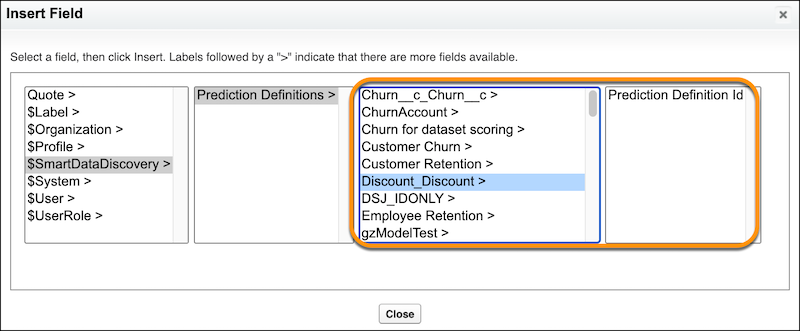
-
Specify the record ID or provide a list of fields and associated values.
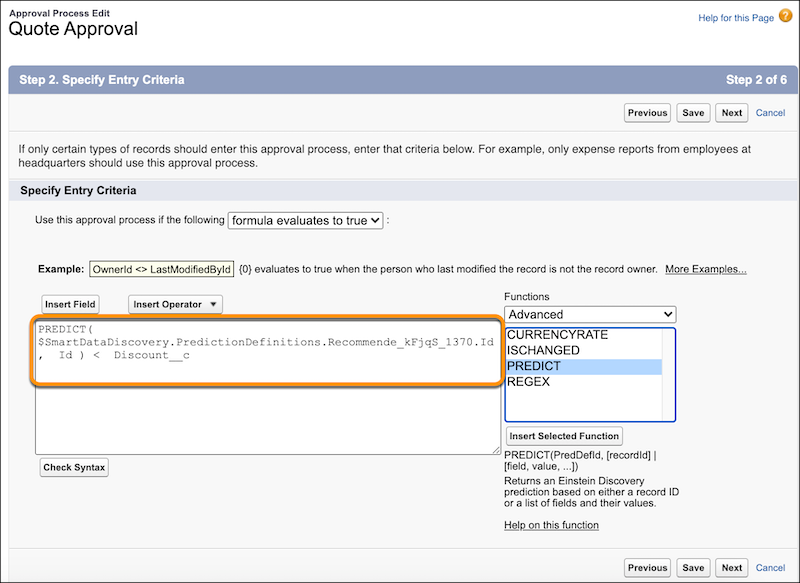
The following example shows the formula for an approval process. It evaluates to TRUE if the predicted outcome for the given record is less than the specified discount amount (Discount__c).
- Click Save.

Example Formula with recordId:
This example calls the PREDICT function and passes a prediction definition and recordId.
Example Formula with List of Fields and Values:
PREDICT($SmartDataDiscovery.PredictionDefinitions.Recommende_kFjqS_1370.Id,
          'Customer_Typec', Text(Customer_Typec), 'List_Price__c', List_Price__c)
This example calls the PREDICT function and passes a prediction definition and list of fields with associated values.
