
You are here:
Handle Quality Alerts
Einstein Discovery displays quality alerts when it detects issues in your training data, your model’s quality metrics, or during cross-validation.
Required Editions

Note Einstein Discovery stories are now models. We wish we could snap our fingers to update
the name everywhere, but you can expect to see the previous name in a few places until we
replace it.
| Available in Salesforce Classic and Lightning Experience. |
| Available with CRM Analytics, which is available for an extra cost in Enterprise, Performance, and Unlimited Editions. Also available in Developer Edition. |
To handle quality alerts:
-
Open the Data Alerts screen.
- Open the model and click Performance.
-
On the Model Metrics overview page, choose View All Alerts
in the Assess Deployment Readiness panel.
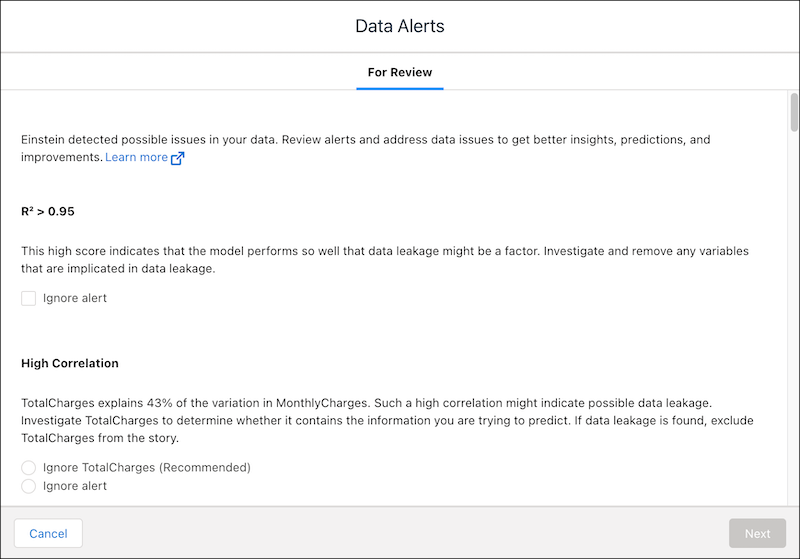
- Review any alerts that Einstein detected in your model or training data.
-
For each alert, decide which action to take.
- If you choose to change a setting, Einstein prompts you to create a model
version.
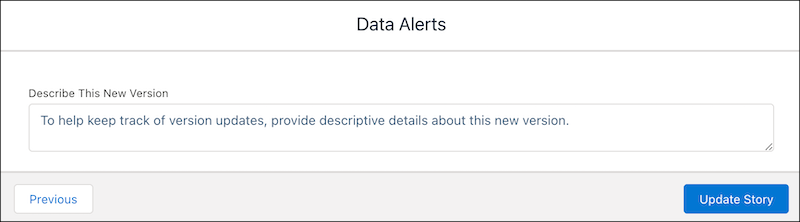
Einstein applies your change and creates a model version to analyze your data using the changed setting.
- If you choose to ignore an alert, Einstein prompts you to confirm.

Ignored alerts are moved to the Resolved tab.
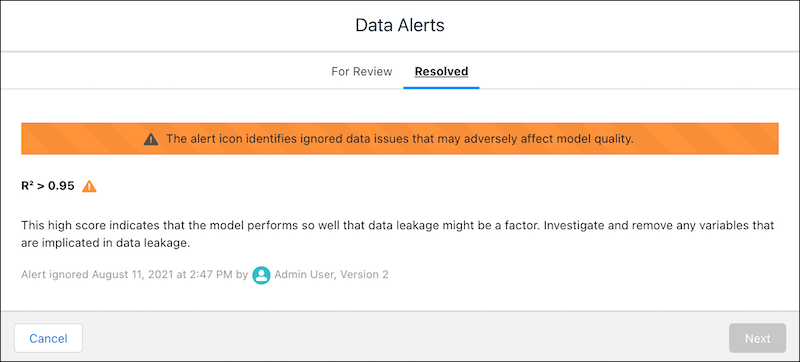
- If you take no action, the alert remains on the Review tab.
- If you choose to change a setting, Einstein prompts you to create a model
version.
- Disparate Impact Alert
Indicates that there is a significant discrepancy in the way different classes are being treated, which can signal bias. - Proxy Variable Alert
Indicates that one or more variables are highly correlated to a sensitive variable, which means that the variable serves as a proxy variable in your analysis, which can signal bias. For example, a loan applicant's street address can serve as a proxy for ethnicity. Bias can be reflected in adverse approval rates if an institution's lending practices are discriminatory. - Outliers Alert
Indicates the presence of uncommonly large or small numbers, potentially from data entry errors or rare events. Outliers influence averages, which can affect the accuracy of insights, predictions, and improvements. - Strongest Predictors Alert
Indicates a variable that is so highly correlated to the outcome that it must be examined for possible data leakage. Leakage occurs when the data used to train your model includes one or more variables that contain the information that you are trying to predict. - Multicollinearity Alert
Indicates that two or more variables are highly correlated (for example, City and Postal Code). These variables can have a duplicate impact on the outcome. This condition is also known as multicollinearity. - High Cardinality Alert
Indicates that a variable contains more than 100 unique values. - Missing Values Alert
Indicates that a variable is missing a high percentage of values, which can lower the quality of your insights or model. - Identical Values Alert
Indicates that all values in a variable are identical. - Recommended Buckets Alert
Indicates that, for a numerical value, Einstein Discovery devised an alternative set of buckets (grouping of data points based on ranges). - Dominant Values Alert
Indicates that most values in a variable are in the same category, which can limit its contribution to the analysis. - No Correlation Alert
Indicates that this variable explains no variation in the outcome and has no statistical significance. - Imbalanced Distribution Alert
Indicates a disproportionate ratio of observations in each class in training data. - Potential Data Leakage Alert
Indicates that a value in an explanatory variable always results in the same outcome value, which can indicate data leakage. Data leakage occurs when your training data contains the information that you’re trying to predict. Leakage results in models that score optimistically high in training but perform less accurately on live data. To produce more realistic models that perform better at predicting outcomes, investigate and remove leaky predictor variables from your model. - Area Under the Curve (AUC) Quality Alert
Indicates that this binary classification model's AUC metric is so high or low that it warrants further examination. - R2 Quality Alert
Indicates that this model's R2 metric is so high or low that it warrants further examination. - Cross-Validation Failure Alert
Indicates that cross-validation failed for this model.
See Also
Did this article solve your issue?
Let us know so we can improve!
