
You are here:
Configure Date Variables
Configure settings for individual date fields in your model.
Required Editions

Note Einstein Discovery stories are now models. We wish we could snap our fingers to update
the name everywhere, but you can expect to see the previous name in a few places until we
replace it.
| Available in Salesforce Classic and Lightning Experience. |
| Available with CRM Analytics, which is available for an extra cost in Enterprise, Performance, and Unlimited Editions. Also available in Developer Edition. |
| User Permissions Needed | |
|---|---|
| To configure date fields in a model: | Create and Update Einstein Discovery Models |
-
On the Model Settings page, click a date field. The variable panel appears.
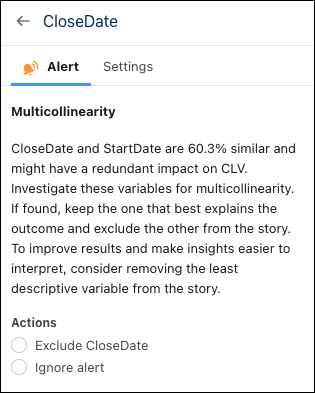
- In the Alerts tab, respond to any suggestions regarding data issues for this field, such as outliers or duplicates. For more information, see Handle Quality Alerts.
-
In the Settings tab, configure the following settings.
Setting Description Transform Optionally, select how to analyze dates by:
- Group by Day of Week
- Group by Month of Year
Include Only Optionally, restrict the date range to include in the analysis by changing the start and end dates. Histogram A graph shows the number of values that occur across the range of dates. Changes take effect after you create the model.
Did this article solve your issue?
Let us know so we can improve!
