
You are here:
Edit General Settings for a Model
You can edit general settings for a model. View the CRM Analytics dataset and select the algorithm and validation type.
Required Editions

Note Einstein Discovery stories are now models. We wish we could snap our fingers to update
the name everywhere, but you can expect to see the previous name in a few places until we
replace it.
| Available in Salesforce Classic and Lightning Experience. |
| Available with CRM Analytics, which is available for an extra cost in Enterprise, Performance, and Unlimited Editions. Also available in Developer Edition. |
| User Permissions Needed | |
|---|---|
| To update model settings: | Create and Update Einstein Discovery Models |
To edit general settings for a model:
- Open the model.
- Click Settings.
-
In the General Settings panel, configure the following
settings.
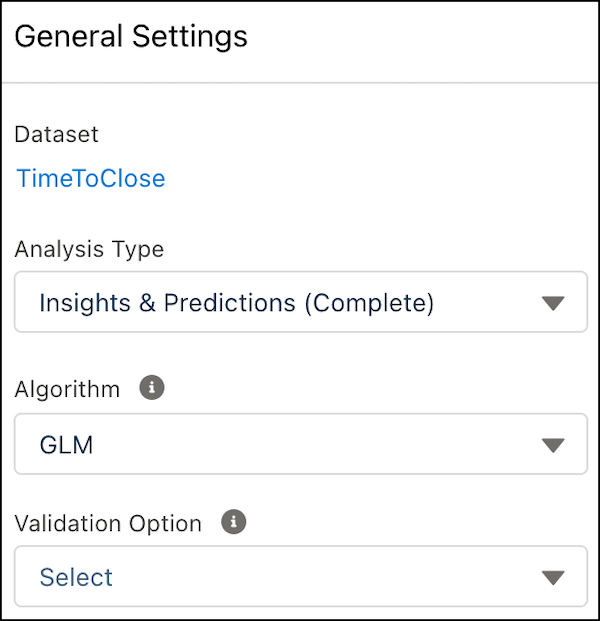
Setting Description Dataset CRM Analytics dataset associated with the model. Validation Choose a validation type for your model. Select one of the following options:
- Training/Validation Ratio to randomly split the observations in the CRM Analytics dataset into a training set and a validation set. The default is 80% training and 20% validation, but you can adjust the slider to change the ratio as needed.
- Validation Dataset to specify a separate CRM Analytics dataset that contains the validation data. You see only the datasets that match the schema of your model’s dataset. Ideally, select a dataset that contains a diverse set of observations that reflect real-world conditions. If you want to compare models for accuracy, selecting the same validation dataset gives you a common, unbiased baseline for evaluation.
- None (the default) uses only k-fold validation.
Algorithm You can choose among different algorithms for Einstein Discovery to use to create the model:
- GLM: Default. Generalized Linear Model is a regression-based algorithm.
- GBM: Gradient Boost Machine is a decision tree-based ensemble machine learning algorithm.
- XGBoost: A decision tree-based, ensemble machine learning algorithm.
- Random Forest: A supervised learning algorithm that uses multiple decision trees, randomization, and other optimization techniques.
Alternatively, select Model Tournament to have Einstein Discovery run all four algorithms and then show the results of the algorithm that performed best.
Changes take effect after you create the model or a model version.
Did this article solve your issue?
Let us know so we can improve!
