
You are here:
Configure Model
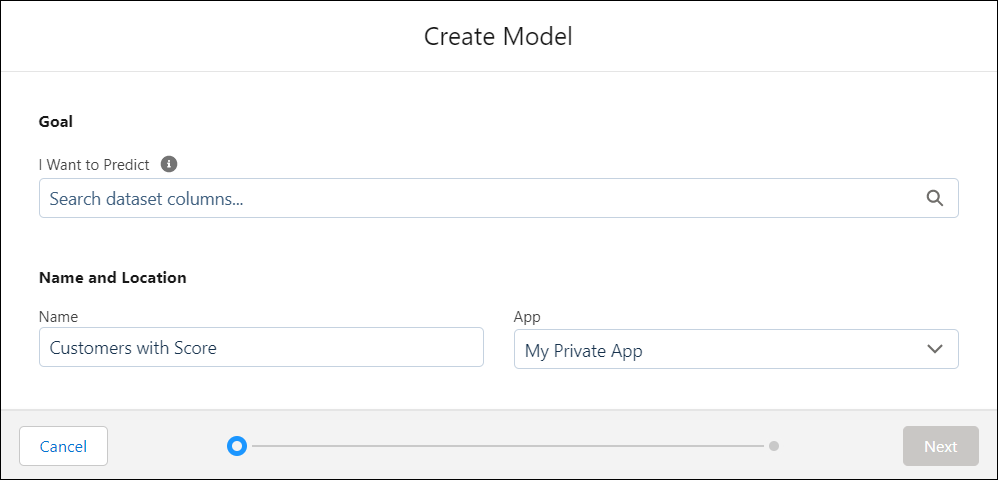
Select the goal, title, and location for your model.

Note Einstein Discovery stories are now models. We wish we could snap our fingers to update
the name everywhere, but you can expect to see the previous name in a few places until we
replace it.
-
Specify the desired outcome (or goal) of your model.
- Occurrences performs an extensive query analysis of dataset values by calculating the number of times a value occurs in a column, including interactions with other columns. For example, the color red occurs 30% of the time in an Automobile dataset, of those rows the most frequent body type is coupe.
-
Another option is to select an outcome variable to analyze (typically a key
performance indicator), and the preferred direction (minimize or maximize) is the
outcome to take. For example, your goal could be to maximize margin or to minimize
costs. Einstein Discovery uses the model goal to orient its analysis and explain the
insights it uncovered from the analysis.
Field Description I Want to Analyze Select the outcome that you want to use. You can choose among the following types of fields:
- number fields (measures), which addresses the numeric use case
- text fields (categories) with two outcome values, which addresses the binary classification use case. For example, public/private, win/lose, approved/rejected, and so on.
- text fields (categories) with 3–10 outcome values, which addresses the multiclass classification use case. For example, three possible services plans or eight possible insurance policies.
Note For a field to appear in this list, it must contain values in a minimum of 400 rows in the dataset.For additional information, see Einstein Discovery Capacities and Requirements.So I Can For numeric and binary classification outcomes, select one of the following options:
- Maximize tells Einstein that you want to maximize the outcome.
- Minimize tells Einstein that you want to minimize the outcome.
Show as whole number >= 0 For numeric outcomes, calculations often result in fractions. Select this option if you want your model outcome values to show up as whole numbers (using automatic rounding). Certain values make sense only when expressed as whole numbers, such as the number of orders per month, or the number of customers entering a retail store.
-
Specify the name and location of your model.
Option Description Model Name Accept the default name or enter a new name. App Select the app where you want to save the model. If you want to share this model with others, save it into a shared app. - Click Next.
Did this article solve your issue?
Let us know so we can improve!
