
You are here:
Embed Einstein Predictions in Tableau Flows
Use the Prediction step in Tableau Prep to include Einstein Discovery predictions directly into your flows. Enrich your flow output with predictions and, optionally, improvements and top factors.
Tableau Documentation for the Prediction Step in Tableau Prep
This topic provides an overview of the Prediction step supported in Tableau Prep version 2021.1.3 or later. For detailed instructions on setting up and using the Predict step in your flows, refer to the following topic in Tableau Prep help: Add Einstein Discovery Predictions to your flow.
Add a Prediction Step to a Flow
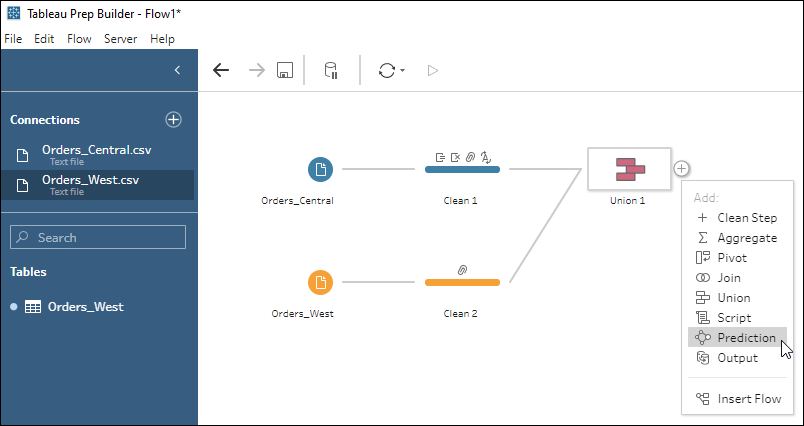
In Tableau Prep as a creator, open a flow, and then add a Prediction step.
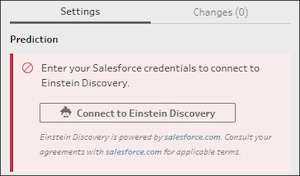
Next, connect to Salesforce with a user account that can access Einstein Discovery.
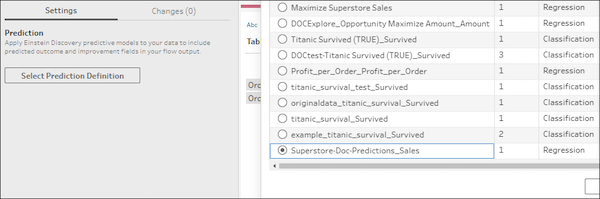
From the list of deployed prediction definitions in Salesforce, select one to use to generate predictions. Fields for prediction values are added to the data source automatically.
Map model fields to flow fields and configure other settings as needed.
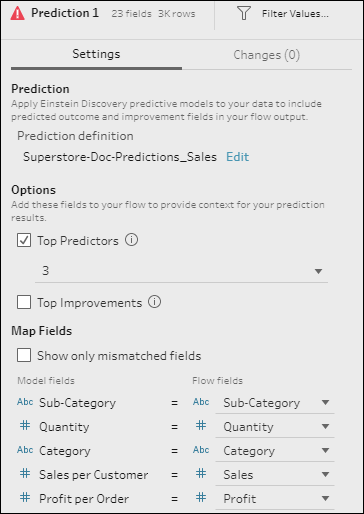
When the flow is run, the Prediction step gets a prediction for each row of data and saves the prediction value, and optionally other information, to the flow output.
