Collaborate on CRM Analytics Dashboards in Experience Cloud Sites
with Annotations
Foster an environment of open communication sparked by CRM Analytics dashboards
embedded in Experience Cloud sites. With annotations, partners and customers can
converse in Chatter feeds on individual dashboard widgets. Annotations are available
whether dashboards are embedded via Visualforce or the Experience Builder.
Required Editions
Available in: Salesforce Classic and Lightning
Experience.
Available for an extra cost in: Enterprise,
Performance, and Unlimited Editions.
Also available in: Developer
Edition.
User
Permissions Needed
To create, customize, or activate a site:
Create and Set Up Experiences
AND is a member of the
community they’re trying to update
To modify CRM Analytics settings:
Analytics Growth permission set license with
Manage Analytics permission
To view, explore, and share embedded CRM Analytics
dashboards for users with an Experience Cloud
license:
Analytics for Communities permission set license with
View Analytics on Communities pages permission
Note Only users with a Customer Community Plus, Partner Community, or Lightning
External Apps Plus license can use this feature.
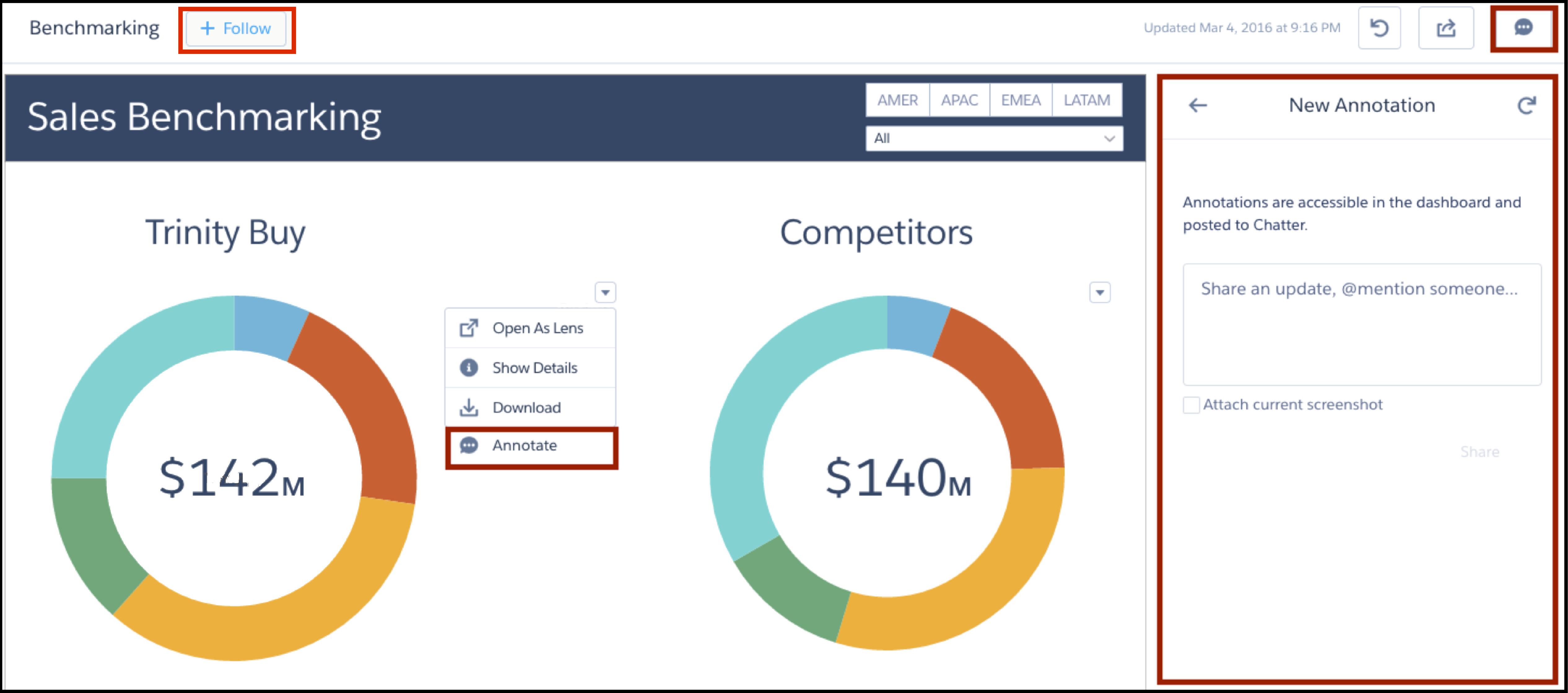
To create annotations, click to open your embedded dashboard in CRM Analytics. Then select
Annotate from the dropdown menu on a widget.
In the annotations panel, you can type messages and @mention people in your org who
have access to the dashboard. You can also share screenshots of the current state
of the dashboard. CRM Analytics dashboard annotations are natively integrated with
Chatter, and comments on dashboards also appear as Chatter posts. If users click
the Follow button, they see all comments on the dashboard.
From Chatter, they can click the dashboard image to navigate directly to the
annotation on the dashboard in CRM Analytics, where they can add to the
conversation. For more information, see Collaborate with Dashboard Annotations.
The visibility of posts depends on the type of user that makes the original post. For
security, external site users can’t see annotations originated by your org’s
internal users (unless the external user is @mentioned). But if an internal user
replies on an annotation started by an external user, then all users can see all
posts. For more information, see the visibility property in the Connect REST API
Developer Guide.
Did this article solve your issue?
Let us know so we can improve!
Loading
Salesforce Help | Article
Cookie Consent Manager
General Information
Required Cookies
Functional Cookies
Advertising Cookies
General Information
We use three kinds of cookies on our websites: required, functional, and advertising. You can choose whether functional and advertising cookies apply. Click on the different cookie categories to find out more about each category and to change the default settings.
Privacy Statement
Required Cookies
Always Active
Required cookies are necessary for basic website functionality. Some examples include: session cookies needed to transmit the website, authentication cookies, and security cookies.
Functional Cookies
Functional cookies enhance functions, performance, and services on the website. Some examples include: cookies used to analyze site traffic, cookies used for market research, and cookies used to display advertising that is not directed to a particular individual.
Advertising Cookies
Advertising cookies track activity across websites in order to understand a viewer’s interests, and direct them specific marketing. Some examples include: cookies used for remarketing, or interest-based advertising.