
You are here:
Format Numbers
Choose either preset or custom number formats. Specify custom formats for positive, negative, and zero values.
Required Editions
| Available in Salesforce Classic and Lightning Experience. |
| Available with CRM Analytics, which is available for an extra cost in Enterprise, Performance, and Unlimited Editions. Also available in Developer Edition. |
| User Permissions Needed | |
|---|---|
| To view visualizations: | Use CRM Analytics |
-
Click
 on any measure field.
-
Choose Format Numbers and choose a preset format.
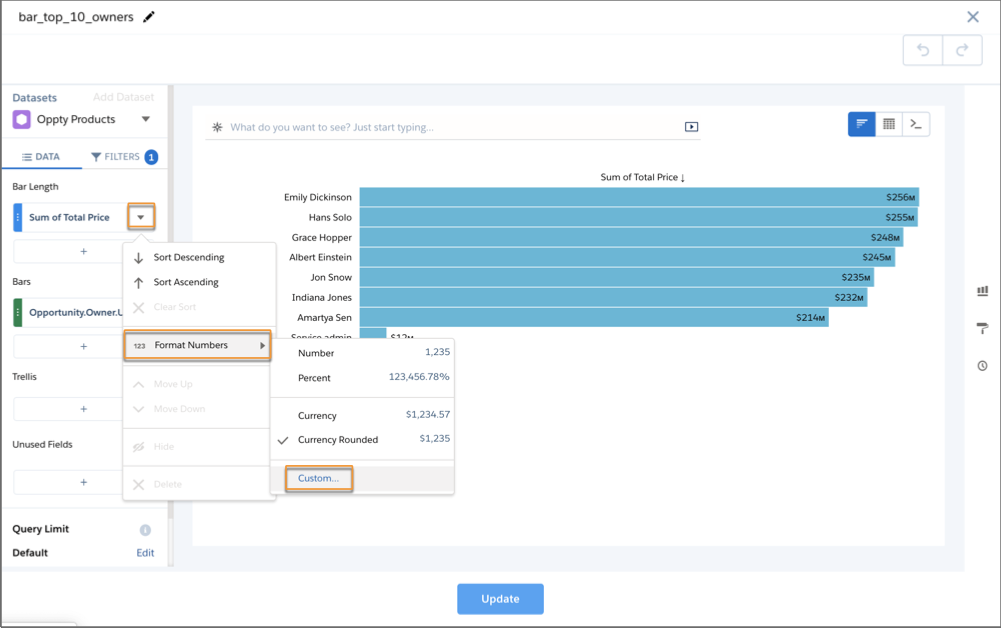
- Click Custom… for more presets or to specify your own custom
format.
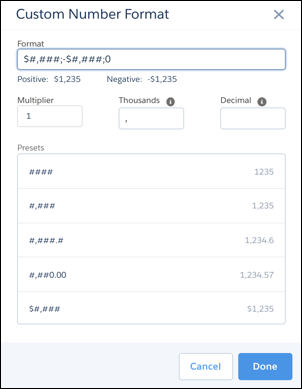
- Use a preset or enter a custom string in the Format string.
For multiple formats, use this syntax: <POSITIVE_FORMAT>;<NEGATIVE_FORMAT>;<ZERO_FORMAT>.
The Format string always uses a comma (,) for the thousands separator and a period (.) for the decimal separator. Change the separator in the Thousands or Decimal string to override the separator in the Format string. CSV downloads ignore the specified separators and always use the default values of comma (,) for thousands and period (.) for decimal.
- Click Custom… for more presets or to specify your own custom
format.
-
Click Done to save the format.
 Note In the Spring ’20 release we unified number behavior in charts, tables, and number widgets.
- 0 values follow formula logic. For example, a format string $#.## with a 0 value returns $0.00.
- Default behavior never returns a negative 0.
- Short numbers like 1.0x always return 1.0x, not 1x.
- Negative and zero formats are optional.
Did this article solve your issue?
Let us know so we can improve!
