
Your analytics are now together in an intuitive and personalized home page that you can
experience in Analytics Studio and the Analytics Tab. On this centralized home page, you can see
the latest changes for your CRM Analytics assets, and dashboards and reports. You can also
customize the home page with items you build for quick access, along with better organization, and
a powerful search experience.
Required Editions
Available in: Lightning Experience
Available in: Essentials, Group, Enterprise, Professional,
Unlimited, and Developer Editions.
Also available with CRM Analytics, which is available for an extra cost in
Performance, Enterprise, Unlimited, and Developer
Editions.
User Permissions Needed
To access Analytics home:
Legacy Folder Sharing
Run Reports AND Manage Dashboards
Enhanced Folder Sharing
Run Reports AND Create and Customize Dashboards
To access CRM Analytics items in Analytics home:
Use CRM Analytics
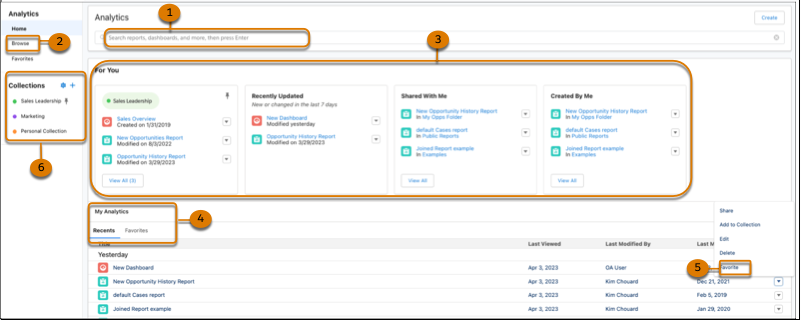
Use search (1) and browse (2) to locate your items through keyword search and filters. For You
(3) organizes analytics to help you find what you’re looking for quickly. Go to My Analytics (4)
to access content from a chronological listing or go to Favorites (5) to open commonly used
items. Use Collections (6) to curate and organize analytics across different apps and folders
and share them with other users.
Browse and Find Analytics Assets The analytics home page provides easy access to all of your apps, dashboards, lenses, reports, and more. With a variety of filter and search options, you can find those assets fast.
Set and Send Smart Notifications Set up CRM Analytics to notify you about changes to your important business metrics, when and where you choose. Attach notification criteria to widgets in dashboards, and select when to run the queries. You can see notifications in CRM Analytics, Lightning Experience, CRM Analytics for iOS, and email. Add recipients from your org to the email’s distribution list to notify colleagues at the same time as yourself.
Get Scheduled Updates with Email Subscriptions Subscribe to lenses and dashboard widgets and receive a daily or weekly email with updates on your most important charts and metrics, and table data in .csv attachments.
Monitor Important Metrics with the CRM Analytics Watchlist The CRM Analytics Watchlist gives users the advantage of capturing and tracking up to 20 KPIs across different dashboards, plus historical trending. No more switching between dashboards to see what has changed, and track your metrics all in one place.
Did this article solve your issue?
Let us know so we can improve!
Loading
Salesforce Help | Article
Cookie Consent Manager
General Information
Required Cookies
Functional Cookies
Advertising Cookies
General Information
We use three kinds of cookies on our websites: required, functional, and advertising. You can choose whether functional and advertising cookies apply. Click on the different cookie categories to find out more about each category and to change the default settings.
Privacy Statement
Required Cookies
Always Active
Required cookies are necessary for basic website functionality. Some examples include: session cookies needed to transmit the website, authentication cookies, and security cookies.
Functional Cookies
Functional cookies enhance functions, performance, and services on the website. Some examples include: cookies used to analyze site traffic, cookies used for market research, and cookies used to display advertising that is not directed to a particular individual.
Advertising Cookies
Advertising cookies track activity across websites in order to understand a viewer’s interests, and direct them specific marketing. Some examples include: cookies used for remarketing, or interest-based advertising.