
You are here:
Special Cases for Matching Records with the augment Transformation
For each record in the left dataset, the augment transformation performs a lookup to find a matching record in the right dataset. However, it’s critical that you understand how the augment transformation handles special cases when matching records.
Let’s look at some examples that illustrate some special cases.
Handling Null Keys
When a record in the left dataset contains a null key, CRM Analytics doesn’t perform a lookup to match the record. Instead, CRM Analytics appends the right columns and inserts null for dimensions, including dates, and '0' for measures.
Let’s look at an example. You apply the augment transformation on the following datasets, set the relationship to "Price,", and match the records based on the Id and ProdId fields.
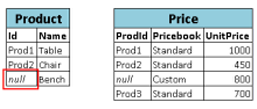
CRM Analytics doesn’t match the last record because the product ID is null. Instead, CRM Analytics inserts a null for the Price.Pricebook dimension and '0' for the Price.UnitPrice measure. Here’s the resulting dataset after the augment.

Handling Empty Keys
CRM Analytics matches empty-value left keys and empty-value right keys.
Let’s look at an example. You apply the augment transformation on the following datasets, set the relationship to "Price,", and match the records based on the Id and ProdId fields.
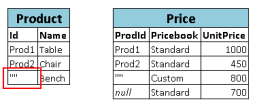
CRM Analytics matches the last record in the Product dataset with the third record in the Price dataset because they both have empty values (""). Here’s the resulting dataset after the augment.

Handling Non-Unique Keys
Although it’s recommended, the left key doesn’t have to be unique. If multiple records have the same left key, CRM Analytics creates the same values for the appended columns.
Let’s look at an example. You apply the augment transformation on the following datasets, set the relationship to "Price,", and match the records based on the Id and ProdId fields.
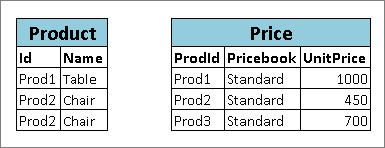
CRM Analytics matches the records in the Product dataset with records in the Price dataset. Here’s the resulting dataset after the augment.

Handling No Match
If the left key doesn't have a match in the right data stream, CRM Analytics appends the right columns, inserting nulls for dimensions, including dates, and sets measures based on whether null measure handling is enabled. If null measure handling is enabled, the augment transformation sets the measures to null. Otherwise, it sets the measures to '0'.
Let’s look at an example where null measure handling isn’t enabled. You apply the augment transformation on the following datasets, set the relationship to "Price,", and match the records based on the Id and ProdId fields.
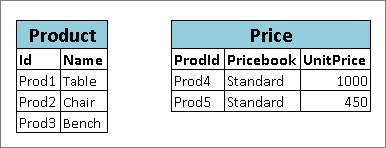
Because no keys match, CRM Analytics doesn’t match any records in the Product dataset with records in the Price dataset. Here’s the resulting dataset after the augment.

If null measure handling was enabled, Price.UnitPrice is null, instead of 0.
Handling Multiple Matches
If the left dataset has a one-to-many relationship with the right dataset, CRM Analytics can find multiple matches for a left record. What CRM Analytics does with multiple matches depends on the specified augment operation. You can specify one of these operations to handle the multiple-match case.
-
LookupSingleValueThe augment transformation returns results from a single row. CRM Analytics randomly selects one row from the list of matched rows.
 Note Each time you run the dataflow, CRM Analytics can return different results depending on the returned row.
For example, you apply the augment transformation on these datasets, set the relationship to "Price," set the operation to
LookupSingleValue, and match the records based on the Id and ProdId fields.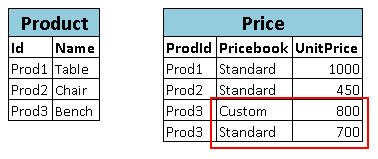
Although there are multiple rows for Prod3 in the Price dataset, CRM Analytics randomly chooses one matching row and returns values based on that row. Here’s the resulting dataset after the augment if CRM Analytics chooses the first Prod3 row.

-
LookupMultiValueCRM Analytics returns results from all matched rows.
For example, you apply the augment transformation on these datasets, set the relationship to "Price," set the operation to
LookupMultiValue, and match the records based on the Id and ProdId fields.
Because the lookup returns multiple rows for Prod3, the dimension Price.Pricebook field in the resulting dataset becomes a multivalue field, showing all dimension values. The measure field Price.UnitPrice contains 1500, which is the sum of 800 and 700. Here’s the resulting dataset after the augment.
 Note If you are augmenting date fields from the right dataset, the
LookupMultiValueoperation can lead to fields containing multiple date values, which can give unexpected results. We recommend that you use theLookupSingleValueoperation when augmenting date fields, or augment the date fields in a separate LookupSingleValue augment node.
