
You are here:
computeRelative Transformation
You can use the computeRelative transformation to analyze trends in your data by adding derived fields to a dataset based on values in other rows. For example, to analyze sales pipeline trends, create derived fields that calculate the number of days an opportunity remains in each stage. You can also calculate the changes to the opportunity amount throughout the stages of the opportunity.

The computeExpression transformation and computeRelative transformation transformations are similar, but the computeExpression transformation performs calculations based on fields within the same row. The computeRelative transformation performs calculations based on the same field in other rows—particularly the current, first, previous, or next rows.
When you define a computeRelative transformation, you specify a source transformation as the input, partition the records, and sort the records within each partition. For example, you can use sfdcDigest transformation to extract opportunity history records, and then use computeRelative transformation to calculate changes in each opportunity over time. You can partition opportunity history records by opportunity ID, and then chronologically sort records within each partition to correctly identify the previous and next values.

Let’s look at an example. To perform trending analysis on the sales pipeline, create a dataflow that contains the following transformations.
sfdcDigest transformation
Extracts the following data from the OpportunityHistory object.
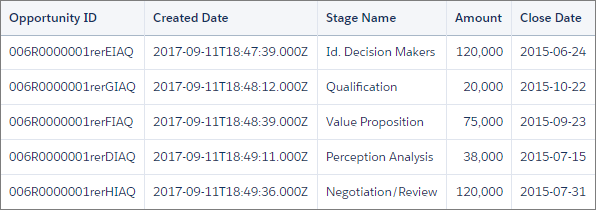
computeRelative transformation
Performs these tasks:
- Partitions the extracted records by opportunity ID.
- Within each partition, sorts the extracted records by CreatedDate in ascending order. Sorting by CreatedDate ensures that the changes that occur for each opportunity are listed in chronological order.
- Adds the following derived fields to the final dataset.
- OpportunityCreatedDate
Determines the date that the opportunity was first created. You can use this date with the actual close date to determine the number of days required to close the sale. The goal is to shorten the sales cycle to recognize revenue.
- AmountPrev
Determines the previous amount of the opportunity. You can use this field to determine if the values of opportunities are increasing or decreasing, which can affect whether you hit your sales targets.
- CloseDatePrev
Determines the previous expected close date for the opportunity. You can use this field to analyze how the expected close date changes over the sales cycle of the opportunity. If the expected close date keeps getting pushed out, identify the issues that are causing the longer sales cycle.
- AmountChange
Uses a SAQL expression to calculate the percentage change of the opportunity amount from its previous amount.
- AmountChangeDirection
Uses a SAQL expression to generate a text value to show the direction in which an opportunity amount has changed: Up, Down, or No Change.
- OpportunityCreatedDate
sfdcRegister transformation
Registers the final dataset that contains the extracted fields from the sfdcDigest transformation and the derived fields from computeRelative transformation.
You create this dataflow definition.
{
  "extractOppHistory": {
        "action": "sfdcDigest",
        "parameters": {
            "object": "OpportunityHistory",
            "fields": [
                {"name": "OpportunityId"},
                {"name": "CreatedDate"},
                {"name": "StageName"},
                {"name": "Amount"},
                {"name": "CloseDate"}
            ]
        }
    },
  "computeTrending": {
    "action": "computeRelative",
    "parameters": {
      "source": "extractOppHistory",
      "partitionBy": ["OpportunityId"],
      "orderBy": [
        {
          "name": "CreatedDate",
          "direction": "asc"
        }
      ],
      "computedFields": [
        {
          "name": "OpportunityCreatedDate",
          "label": "Opportunity Created Date",
          "description": "Determines the date that the opportunity was first created.",
          "expression": {
            "sourceField": "CreatedDate",
            "offset": "first()",
            "default": "current()"
          }
        },
        {
          "name": "AmountPrev",
          "label": "Previous Amount",
          "description": "Determines the previous amount of the opportunity",
          "expression": {
            "sourceField": "Amount",
            "offset": "previous()",
            "default": "null"
          }
        },
        {
          "name": "CloseDatePrev",
          "label": "Previous Close Date",
          "description": "Determines the previous expected close date for the opportunity",
          "expression": {
            "sourceField": "CloseDate",
            "offset": "previous()",
            "default": "current()"
          }
        },
        {
          "name": "AmountChange",
          "label": "Amount % Change",
          "description": "Determines percentage change from previous amount",
          "expression": {
            "saqlExpression": "(current(Amount)-previous(Amount))/previous(Amount)*100",
            "type": "Numeric",
            "scale": 2,
            "default": "null"
          }
        },
        {
          "name": "AmountChangeDirection",
          "label": "Amount Change Direction",
          "description": "Determines text to indicate direction of change",
          "expression": {
            "saqlExpression": "case when current(Amount)>previous(Amount) then \"Up\" when current(Amount)<previous(Amount) then \"Down\" else \"No Change\" end",
            "type": "Text",
            "default": ""
          }
        }
      ]
   }
  },
  "Register_OppportunityHistory_Dataset": {
    "action": "sfdcRegister",
    "parameters": {
      "alias": "SalesPipelineTrending1",
      "name": "Sales Pipeline Trending1",
      "source": "computeTrending"
    }
  }
}
The dataflow runs and creates the dataset with the new derived fields.

Notice that CRM Analytics partitions the records by opportunity ID and then sorts the records in ascending order based on the CreatedDate field within each partition. CRM Analytics can now use the previous and next rows within each partition to determine changes in field values in the dataset.
- computeRelative Parameters
When you define a computeRelative transformation, you set the action attribute tocomputeRelative. You also specify the parameters for the input source, partition-by field, sort field, and derived field definitions.
