
You are here:
Connect and Sync Your Data to CRM Analytics
Use the CRM Analytics connectors to connect data inside and outside of Salesforce. You can access data in your local org and external Salesforce orgs, apps, data warehouses, and database services.
After you connect to a data source, configure data sync to extract the needed source data into connected objects. You can then prepare the data in these connected objects using a recipe to create your final dataset.
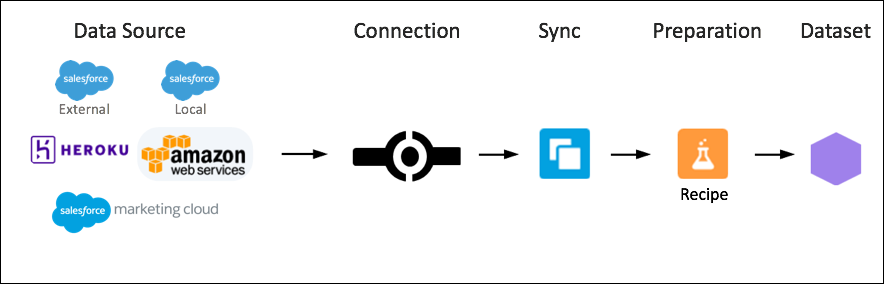
- Connect to a Data Source or Target
Connect to data in your local Salesforce org, external orgs, and other sources, such as apps, data warehouses, and database services. Use an input connector to extract data from a data source. Use an output connector to load the recipe results into a target. - Connect to Local Salesforce Data
Use the Salesforce Connector to manage the data synced between your local Salesforce org and CRM Analytics. Filter data synced to CRM Analytics, create more connections using the Salesforce Local connector, manage objects between connections, and add or remove objects and fields from sync. Use the Salesforce External connector to sync data from a remote Salesforce org. - Connect to Data Outside of Salesforce
Create a remote connection to sync external data with CRM Analytics. For each connector, we provide information on how to create the connection, configure its properties, and track important considerations. - Pre-Pull Data for Recipes with Data Sync
Use data sync to pull data to CRM Analytics on a regular schedule. By scheduling sync from Salesforce and remote systems ahead of time, your recipes have less to do and run faster. To lighten the load even more, CRM Analytics can sync supported local Salesforce data incrementally by default, meaning that only data that’s changed gets synced.
Did this article solve your issue?
Let us know so we can improve!
