
You are here:
New Connector Version Upgrades and Considerations
The remote connectors that you use to sync data to CRM Analytics have new versions. Customers new to CRM Analytics after August 1, 2021 use only the new connector versions, while customers before August 1 can choose when to upgrade. If you choose to be an early adopter, you can switch over to the new connector versions and try them out now. During the Spring ’22 release, we plan to auto-switch customers to the new connector version when it reaches or exceeds the level of functionality and performance of the legacy connector version. We plan to finish the auto-switching during the Summer ’22 release.
Upgradable Connectors
Your existing connections created with one of these connectors stay on the legacy version until you upgrade using the connector’s legacy toggle.
| Connector | Notes |
|---|---|
| Amazon Redshift Connector | The new version doesn’t use Amazon S3. The Master Symmetric Key, AWS Secret Access Key, AWS Access Key ID, and S3 Bucket Name settings aren’t used. |
| Amazon S3 Connector | The new version supports connecting to objects encrypted with customer master keys stored in the AWS Key Management Service or a customer-generated key in the 256-bit AES format. |
| AWS RDS Aurora MySQL Connector | |
| AWS RDS Aurora PostgresSQL Connector | |
| AWS RDS MariaDB Connector | |
| AWS RDS MySQL Connector | |
| AWS RDS PostgreSQL Connector | |
| AWS RDS SQL Server Connector | |
| Google BigQuery Legacy SQL Connector | BigQuery Storage Read API is now supported, which can increase throughput. Set the new version’s Use Storage API property to true to use BigQuery Storage API. The new version doesn’t use the staging environment. |
| Google BigQuery Standard SQL Connector | BigQuery Storage Read API is now supported, which can increase throughput. Set the new version’s Use Storage API property to true to use BigQuery Storage API. The new version doesn’t use the staging environment. |
| Heroku Postgres Connector | |
| Microsoft Azure SQL Database Connector | |
| Microsoft Synapse Analytics Connector | |
| NetSuite Connector | The new version names objects differently than the legacy version. Update your recipes and dataflows with the new object names after upgrading. |
| Salesforce External Connector | |
| Salesforce Contacts OAuth 2.0 Connector for Marketing Cloud Engagement | The new version makes more Marketing Cloud Engagement data accessible through expanded Data Extension support. |
| Snowflake Connector | |
| Zendesk Connector |
Upgrade path for existing connections We recommend that you upgrade and fully test the new connector version in your Sandbox org. Make the switch, run data sync, then run the recipes and dataflows that use the data. Check the data to confirm data is transmitting and populating correctly. To switch back from the new version to legacy connector, select Use legacy connector.
- Select Connect to Data on the Connect tab of the Data Manager.
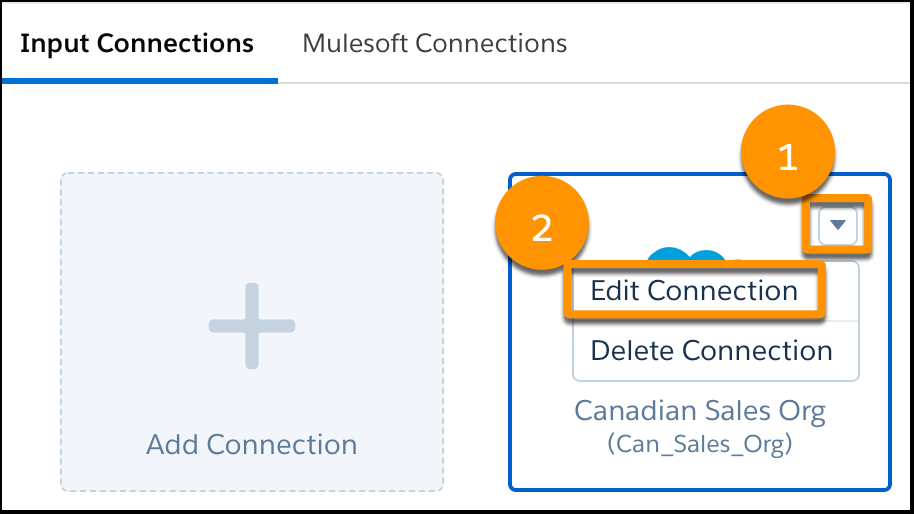
- Select the connection’s menu (1) and click Edit Connection
(2).
- Deselect Use legacy connector to activate the new version.

 Note If you don’t see this option, you’re likely already on the new version. Contact Salesforce Customer Support to discuss if your connection is eligible to revert to the legacy version.
 - Fill in new properties as required.
- Click Save and Test.
Manually Migrated Connectors
Your existing connections created with one of these connectors stay on the legacy version until you manually migrate to the new version.
| Connector | Notes |
|---|---|
| Google Analytics Core Reporting v4 Connector | The new version supports custom objects. Using core reporting API v4.0 provides additional Google Analytics options. You need to enable v4.0. |
| Marketo Connector | There are two connector options, Marketo Connector and Marketo Legacy Connector, that reflect the new or legacy version. These connectors don‘t use the legacy connector toggle. The new connector version supports filtering on select objects. |
| Oracle Eloqua Connector | The new version currently uses different field names, includes more objects than the legacy version and doesn’t yet support the Activity object. |
| SAP HANA Connector | There are two connector options, SAP HANA Cloud Connector and SAP HANA Connector, reflecting the new or legacy version. These connectors don’t use the legacy connector toggle. The new connector version supports filtering, uses different connection properties, and is JDBC-based. |
Upgrade path for existing connections To migrate, create a connection with the connector mirroring the settings of your legacy connection and any new required properties. Then, update your recipes and dataflows to use the external objects from the new connection. Keep the legacy version of the connection for troubleshooting. When you create a connection from the manually migrated group, it always uses the new version.
Your connector upgrade strategy is based on the complexity of your sources and data. Generally, you can do a Sandbox comparison or build mirror connections, then generate sync objects that you can compare. Database-based connectors are inherently less complicated and are more likely to have parity. Some of the API-based connectors, such as Marketing Cloud Engagement, Netsuite, and Eloqua, have complexities that require more attention to reach parity.
