If a dimension field contains dates in different formats, use the Format Dates recipe
transformation to standardize the format for all values in the field. A consistent format enables
you to correctly filter and group records by date, including filtering by date component, such as
month. It also ensures that you can successfully convert the field type from dimension to
date.
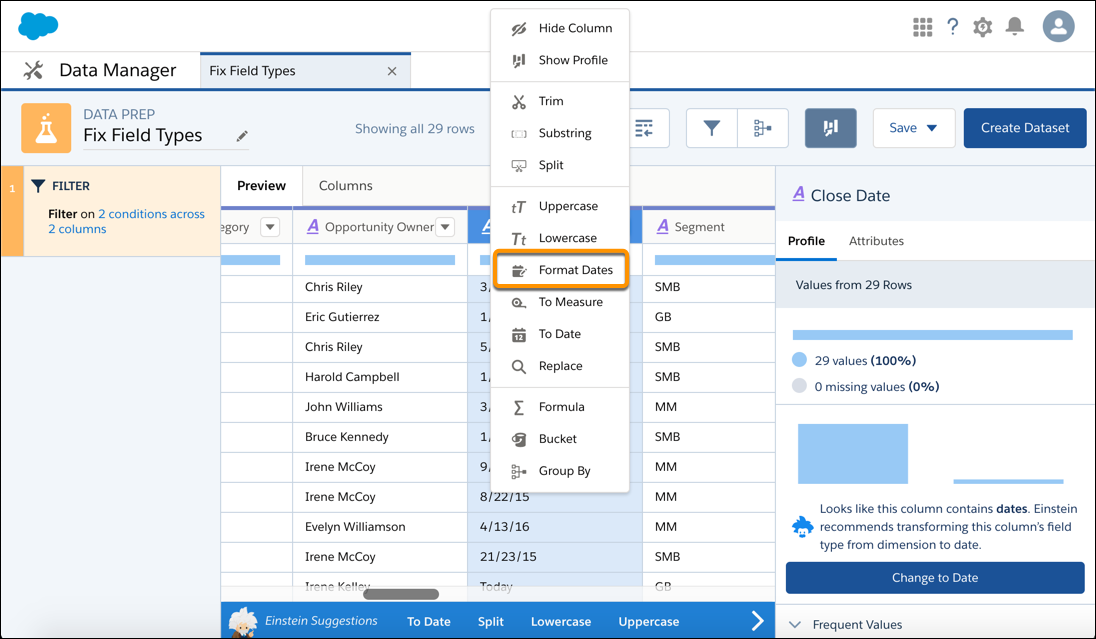
On the column header of the dimension field, click .
Select Format Dates.
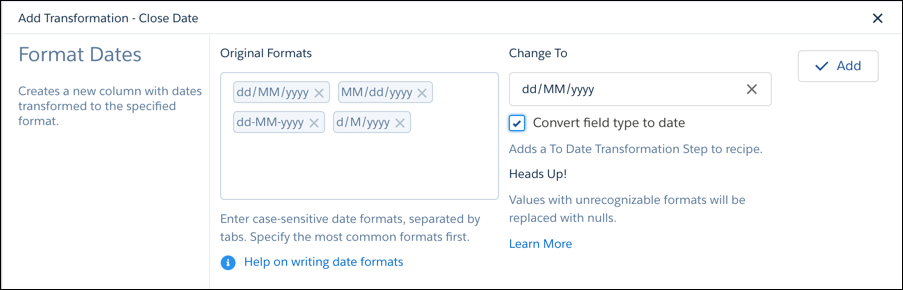
Analytics detects the formats of the dates in the field.
Note The order of the date formats in the Original Formats box matters. For
example, if a date is 01/06/2011, the date format could be dd/MM/yyyy or MM/dd/yyyy. The Date
Format transformation assumes the first matching format shown the Original Date Format box is
the right one.
If a date format isn’t detected, enter it in the Original Formats box.
To convert a dimension field with dates to a date field type, select Convert
field type to date.
Select the desired date format in the Change To field.
Click Add and save the recipe.
When you run the recipe, the transformation creates a field with the dates standardized in the
selected format. If CRM Analytics can’t determine the original format or the date doesn’t have a
value for a date component, the transformation replaces the date with null. For example, if you
standardize on the MM/dd/yyyy: hh:mm:sssz format and a date value doesn’t
have the seconds date component (sssz), CRM Analytics replaces the date
with null.
We use three kinds of cookies on our websites: required, functional, and advertising. You can choose whether functional and advertising cookies apply. Click on the different cookie categories to find out more about each category and to change the default settings.
Privacy Statement
Required Cookies
Always Active
Required cookies are necessary for basic website functionality. Some examples include: session cookies needed to transmit the website, authentication cookies, and security cookies.
Functional Cookies
Functional cookies enhance functions, performance, and services on the website. Some examples include: cookies used to analyze site traffic, cookies used for market research, and cookies used to display advertising that is not directed to a particular individual.
Advertising Cookies
Advertising cookies track activity across websites in order to understand a viewer’s interests, and direct them specific marketing. Some examples include: cookies used for remarketing, or interest-based advertising.