
You are here:
Guidelines for Formatting Dates
Review these guidelines when working with dates.
Date Formats
CRM Analytics supports these date formats. Formats are case sensitive.
For Date fields, specify the format of the date by using one of the following supported formats. Dates must match the format exactly and can't have any extra text. For example, if the date format is "MM-dd-yyyy hh:mm:ss" and the value is "12-31-2015 12:00:00.0000", the upload fails because the value has extra milliseconds.

Note The date formats listed here are the two-digit versions for
date fields that use leading zeros; for example,
03/06/14 09:01:06 AM. If a date
field doesn't have leading zeros, use the one-digit version of the format. For example, use
the format M/d/yy h:m:s a for date values such as
3/6/14 9:1:26 AM. If you use a two-digit format for a field, rows containing values
with one-digit date parts will fail.The timestamp part of each date format is optional.
| Format | Sample Value |
|---|---|
| yyyy-MM-dd'T'HH:mm:ss.SSS'Z' | 2014-04-29T16:53:34.000Z |
| yy-MM-dd'T'HH:mm:ss.SSS'Z' | 14-04-29T16:53:34.000Z |
| yyyy-MM-dd'T'HH:mm:ss'Z' | 2014-04-29T16:53:34Z |
| yy-MM-dd'T'HH:mm:ss'Z' | 14-04-29T16:53:34Z |
| yyyy-MM-dd HH:mm:ss | 2014-06-03 11:31:45 |
| yy-MM-dd HH:mm:ss | 14-06-03 11:31:45 |
| dd.MM.yyyy HH:mm:ss | 03.06.2014 11:31:45 |
| dd.MM.yy HH:mm:ss | 03.06.14 11:31:45 |
| dd/MM/yyyy HH:mm:ss | 03/06/2014 11:31:45 |
| dd/MM/yy HH:mm:ss | 03/06/14 11:31:45 |
| dd/MM/yyyy hh:mm:ss a | 03/06/2014 11:31:45 AM |
| dd/MM/yy hh:mm:ss a | 03/06/14 11:31:45 AM |
| dd-MM-yyyy HH:mm:ss | 03-06-2014 11:31:45 |
| dd-MM-yy HH:mm:ss | 03-06-14 11:31:45 |
| dd-MM-yyyy hh:mm:ss a | 03-06-2014 11:31:45 AM |
| dd-MM-yy hh:mm:ss a | 03-06-14 11:31:45 AM |
| MM/dd/yyyy hh:mm:ss a | 06/03/2014 11:31:45 AM |
| MM/dd/yy hh:mm:ss a | 06/03/14 11:31:45 AM |
| MM-dd-yyyy hh:mm:ss a | 06-03-2014 11:31:45 AM |
| MM-dd-yy hh:mm:ss a | 06-03-14 11:31:45 AM |
| HH:mm:ss dd/MM/yyyy | 11:31:45 03/06/2014 |
| HH:mm:ss dd/MM/yy | 11:31:45 03/06/14 |
These formats use the following symbols:
| Symbol | Meaning |
|---|---|
| yyyy or yy | Four-digit year (yyyy) or two-digit year (yy) |
| MM | Two-digit month (01–12) |
| M | One-digit month when month less than 10 (1–12) |
| dd | Two-digit day (01–31) |
| d | One-digit day when day less than 10 (1–31) |
| 'T' | A separator that indicates that time of day follows |
| HH | Two-digit hour (00–23) |
| H | One-digit hour when hour less than 10 (0–23) |
| mm | Two-digit minute (00–59) |
| m | One-digit minute when minute less than 10 (0–59) |
| ss | Two-digit second (00–59) |
| s | One-digit second when second less than 10 (0–59) |
| SSS | Optional three-digit milliseconds (000–999) |
| w | Week in year (1-52) |
| Y | Week-based year (Example: for December 31, 2019, the output is 2020, as December 31 falls in the first week of 2020.) |
| 'Z' | The reference UTC time zone |
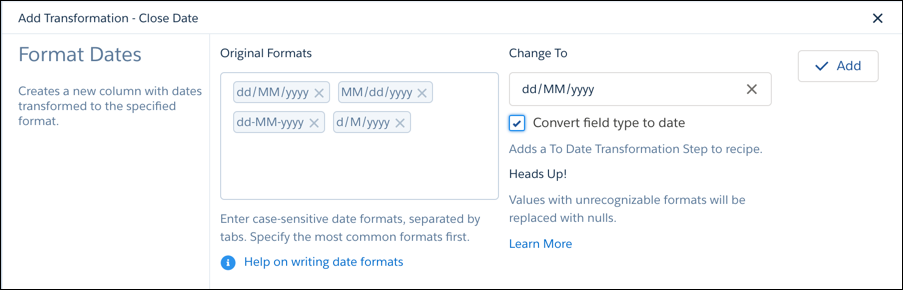
- When you configure the Format Dates transformation, CRM Analytics detects the formats of
the dates in the column. The order of the date formats listed in the Original Formats box
matters. For example, if a date is 01/06/2011, the date format could be dd/MM/yyyy or
MM/dd/yyyy. The Date Format transformation assumes the first matching format shown the
Original Date Format box is the right one. If you want to use the other format, add it as
the first date format in the box.
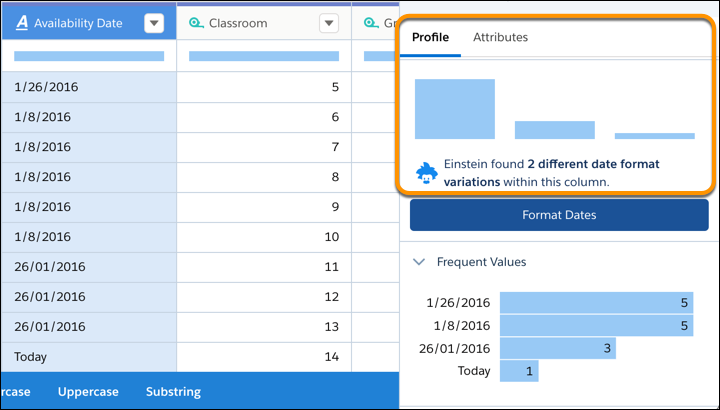
- In the column profile, the histogram shows a bar for each date format. If applicable, the
histogram also shows one extra bar for all dates for which the format couldn't be
determined. Notice that the column profile says that there are two different date formats,
even though there are three bars in the histogram.
Did this article solve your issue?
Let us know so we can improve!
