Loading
CRM Analytics
Table of Contents
Select Filters

          No results
          No results
          Here are some search tips

          Check the spelling of your keywords.
          Use more general search terms.
          Select fewer filters to broaden your search.

          Search all of Salesforce Help
          Convert a Measure Field Type to Dimension

          Convert a Measure Field Type to Dimension

          When you load data into a dataset, CRM Analytics tags a dimension field as a measure if it contains only numbers. For example, CRM Analytics tags a numerical Room Number field as a measure, even though it’s actually a dimension that identifies rooms. To use dimension functionality, such as grouping and filtering by dimension fields, use the To Dimension transformation to change the measure field type to dimension.

          Required Editions

          User Permissions Needed
          To create a recipe: Edit Analytics Dataflows OR Edit Dataset Recipes
          Note
          Note To convert a measure to a dimension in a Data Prep recipe, see Number to Text Transformation: Convert the Column Type.
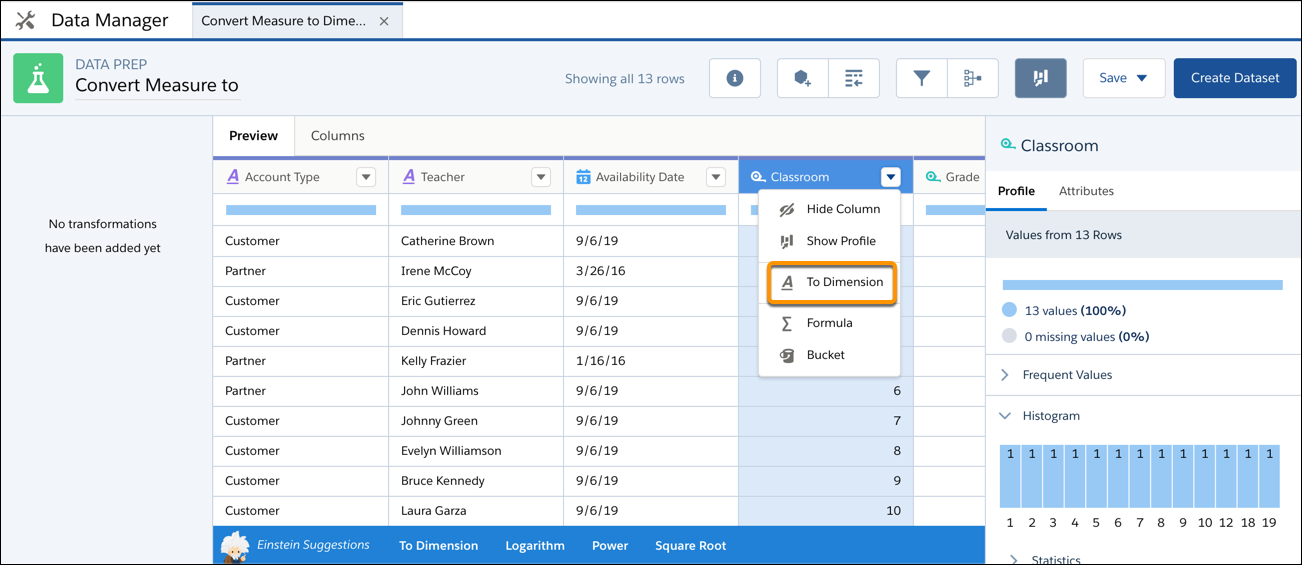
          1. On the column header of the measure field, click Column menu button, and then select To Dimension.
            The column dropdown for a measure column shows lots of transformations, including the To Dimension transformation.
          2. Click Add and save the recipe.

          Run the recipe to create a new field with the dimension field type.

           
          Loading
          Salesforce Help | Article