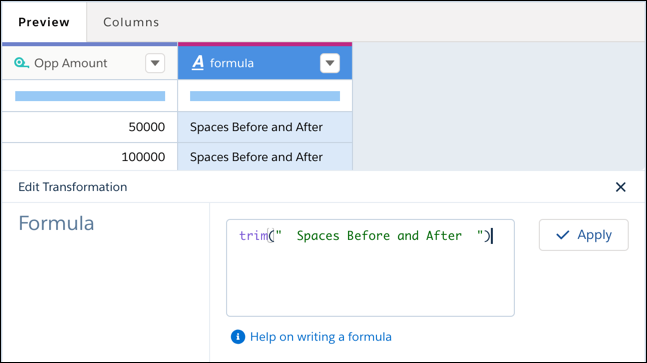
Rimuove la sottostringa specificata dall'inizio e dalla fine di una stringa. Per rimuovere gli spazi iniziali e finali, non specificare una sottostringa.
Versioni (Edition) richieste
Disponibile in Salesforce Classic e Lightning Experience.
Disponibile con CRM Analytics, disponibile a sua volta con un supplemento di prezzo nelle versioni Enterprise Edition, Performance Edition e Unlimited Edition. Disponibile anche nella versione Developer Edition.
Sintassi
Suggerimento Utilizzare la funzione trim in una query SAQL per eliminare altri tipi di caratteri.
trim(string,[substring])
Argomenti
Argomento
Descrizione
stringa
Campo dimensione o stringa di testo da cui rimuovere la sottostringa specificata.
sottostringa
Facoltativo. Il valore rimosso dalla stringa.
Esempio
Si desidera rimuovere i due spazi iniziali prima e dopo una stringa.
trim(" Spaces Before and After ")
Questo articolo ha risolto il problema?
Facci sapere, così possiamo migliorare!
Caricamento
Salesforce Help | Article
Cookie Consent Manager
General Information
Required Cookies
Functional Cookies
Advertising Cookies
General Information
We use three kinds of cookies on our websites: required, functional, and advertising. You can choose whether functional and advertising cookies apply. Click on the different cookie categories to find out more about each category and to change the default settings.
Privacy Statement
Required Cookies
Always Active
Required cookies are necessary for basic website functionality. Some examples include: session cookies needed to transmit the website, authentication cookies, and security cookies.
Functional Cookies
Functional cookies enhance functions, performance, and services on the website. Some examples include: cookies used to analyze site traffic, cookies used for market research, and cookies used to display advertising that is not directed to a particular individual.
Advertising Cookies
Advertising cookies track activity across websites in order to understand a viewer’s interests, and direct them specific marketing. Some examples include: cookies used for remarketing, or interest-based advertising.