A right join in CRM Analytics includes all rows from the right and only matching rows
from the left (recipe data). The join includes all matched rows in the target when multiple rows
match.
Required Editions
Available in Salesforce Classic and Lightning Experience.
Available with CRM Analytics, which is available for an extra cost in
Enterprise, Performance, and Unlimited Editions. Also available in
Developer Edition.
Example
Our company's marketing team captures demographic data in an external data source for
opportunities stored in Salesforce. To help create more targeted campaigns, the team is
segmenting our current opportunities by the Education Level demographic. Let’s use a right
join to add the opportunity data to the demographic data.
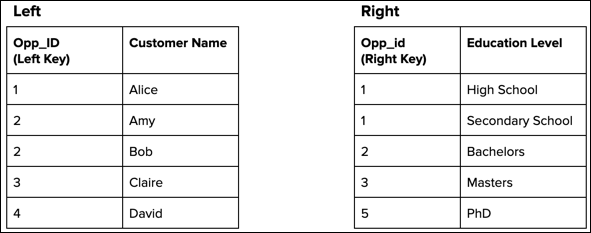
Consider the following two data streams that feed the recipe’s target dataset. To
illustrate how this recipe function handles unmatched rows and duplicate keys, we included
them in both data streams.
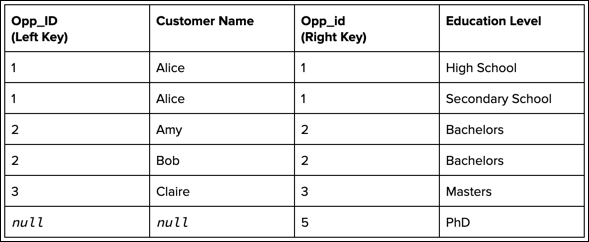
After performing the right join based on the matching keys, the recipe produces the
following target dataset.
All rows from the right, including rows without a match and rows with multiple matches,
are included in the target. Because Opp_id 2 has two matches on the left (Amy and Bob),
the target contains a separate record for each of them. Also, because Opp_id 5 doesn’t
have a match, the Opp_ID and Customer Name columns are null for that record.
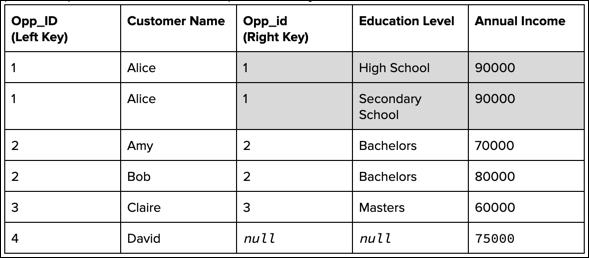
Warning If duplicate records contain measures (as shown for Opp_id 1 in the
following screenshot), don’t double count the measures when aggregating the records. To
prevent duplicate records, use a lookup instead of a join.
We use three kinds of cookies on our websites: required, functional, and advertising. You can choose whether functional and advertising cookies apply. Click on the different cookie categories to find out more about each category and to change the default settings.
Privacy Statement
Required Cookies
Always Active
Required cookies are necessary for basic website functionality. Some examples include: session cookies needed to transmit the website, authentication cookies, and security cookies.
Functional Cookies
Functional cookies enhance functions, performance, and services on the website. Some examples include: cookies used to analyze site traffic, cookies used for market research, and cookies used to display advertising that is not directed to a particular individual.
Advertising Cookies
Advertising cookies track activity across websites in order to understand a viewer’s interests, and direct them specific marketing. Some examples include: cookies used for remarketing, or interest-based advertising.