
You are here:
Edit Nodes in the Dataflow
When you edit a dataflow node, for example to change its name, or add or remove fields, consider that these changes can impact downstream nodes. If you're manually editing nodes in the JSON dataflow definition file, make sure that your changes are reflected in downstream nodes. If you're working in the dataflow editor, CRM Analytics propagates many of your changes to downstream nodes for you.
Renaming Node Names
When you rename a node in the dataflow JSON, you need to manually check that the name is unique and change the name wherever the node is referenced in downstream nodes.
In the dataflow editor, CRM Analytics validates that the new name is unique, and changes the name in downstream nodes for you.
Adding Fields in a Node
When you add a field to a node in the dataflow JSON, consider that you also need to add the field in these downstream nodes.
- augment: If you want to augment the new field on other data in the dataflow, add the
field to the
right_selectparameter in the corresponding augment node. - sliceDataset: If there is a downstream sliceDataset node with the
modeparameter set toselect, add the new field to thefieldsparameter to make sure it isn't dropped.
When you add a field to a node in the dataflow editor, CRM Analytics offers to propagate the field in downstream augment and sliceDataset nodes. If you choose to propagate your changes, CRM Analytics adds the new field to:
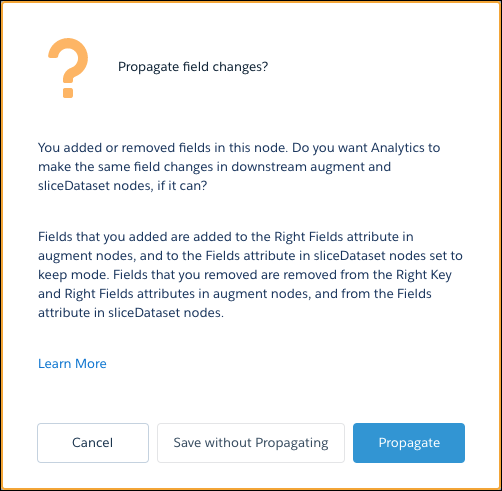
- The Right Fields attribute in downstream augment nodes.
- The Fields attribute in downstream sliceDataset nodes where the Mode attribute is set to Keep.
Removing Fields in a Node
When you remove a field in a node in the dataflow JSON, the dataflow can fail if you don’t also remove the field in these places:
- left_key, right_key, and right_select parameters in downstream augment nodes.
- The
fieldsparameter in downstream sliceDataset nodes. - Downstream computeExpression or computeRelative nodes that reference the field.
When you remove a field in a node in the dataflow editor, CRM Analytics offers to propagate the field in downstream augment and sliceDataset nodes. If you choose to propagate your changes, CRM Analytics removes the field from:
- The Left Key, Right Key, and Right Fields attributes in downstream augment nodes.
- The Fields attribute in downstream sliceDataset nodes.

You see the propagate option whenever you add or remove fields from these types of nodes.
- sfdcDigest
- digest
- augment
- computeExpression
- computeRelative
- sliceDataset
