
You are here:
Restore a Previous Version of a Dataflow
CRM Analytics uses version history to create copies of dataflows when you edit them so you can restore a previous version.
- In CRM Analytics, click Data Manager in the left pane. Data Manager opens to the Monitor tab with the Jobs view selected.
- Click the Dataflows & Recipes tab.
- Open a dataflow, then click the history icon (1). All versions of the dataflow appear in the Versions panel (2), with the live version on top.
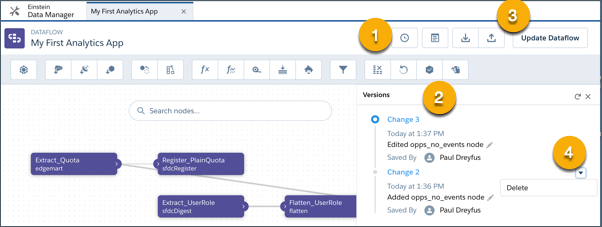
- Revert to a previous version by clicking its name, such as Change 2, then click Update Dataflow (3).
- To delete a previous version, click the dropdown (4) and click Delete.
Did this article solve your issue?
Let us know so we can improve!
