
You are here:
filter Transformation
The filter transformation removes records from an existing dataset. You define a filter condition that specifies which records to retain in the dataset.

Note To filter rows in a Data Prep recipe, see Filter Node: Filter Rows. To do it in a Data Prep Classic recipe, see Add a Filter in a Recipe.

Example
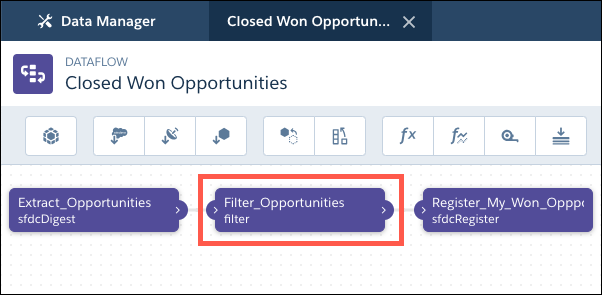
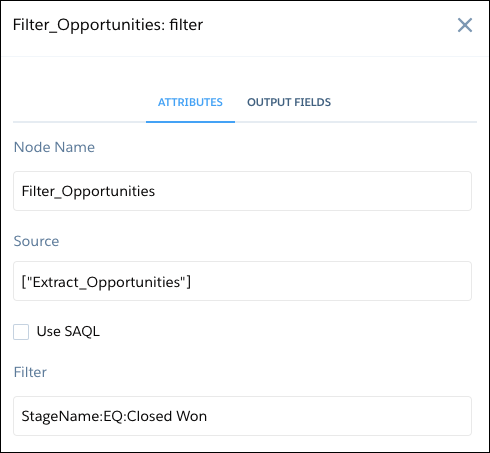
Let’s look at an example. You want to create a dataset that contains only opportunities that were Closed Won. First, you extract all opportunities from the Opportunity object. Next, you filter the records so that you only include opportunities with a Closed Won stage name.
You create the following dataflow.
| Dataflow | Filter Node in Dataflow |
|---|---|
|
|
Here’s the dataflow JSON.
{
   "Extract_Opportunities": {
      "action": "sfdcDigest",
      "parameters": {
         "object": "Opportunity",
         "fields": [
            { "name": "Id" },
            { "name": "Name" },
            { "name": "Amount" },
            { "name": "StageName" },
            { "name": "CloseDate" },
            { "name": "AccountId" },
            { "name": "OwnerId" }
         ]
      }
   },
   "Filter_Opportunities": {
      "action": "filter",
      "parameters": {
         "filter": "StageName:EQ:Closed Won",
         "source": "Extract_Opportunities"
      }
   },
   "Register_My_Won_Oppportunities_Dataset": {
      "action": "sfdcRegister",
      "parameters": {
         "alias": "MyWonOpportunities",
         "name": "MyWonOpportunities",
         "source": "Filter_Opportunities"
      }
   }
}
For more complex filters, you can use SAQL in a filter node.
Depending on your need, you can filter Salesforce object records at different levels:
- Transformation level: To filter a stream of data loaded into a dataset, add a filter transformation to the dataflow. Use a filter transformation instead of an sfdcDigest transformation filter because complex filters in an sfdcDigest transformation impact global filters. To reduce the amount of data processing downstream, add the filter transformation as early as possible in the dataflow.
- Connection level: To prevent Salesforce records from being loaded into any dataset, add the filter on the connected object. You can add a filter in the sync settings for the connected Salesforce object.
- filter Transformation Parameters
When you define a filter transformation, you set the action attribute tofilter Transformationand specify the parameters. - filter Expression Syntax
You create a filter expression in the filter transformation based on one or more dimensions in a dataset. You can use a standard filter expression or a SAQL filter expression.
Did this article solve your issue?
Let us know so we can improve!
