
You are here:
Get Started with Data Integration
In CRM Analytics, data integration involves gathering and preparing the Salesforce and external data you want to analyze. External data is data that resides outside of the Salesforce org that you use for Analytics, such as data from another Salesforce org, outside applications, spreadsheets, and databases. After integrating the data, you prepare it into datasets. Data preparation is the process of transforming your data into a form that’s meaningful and valuable to the people consuming it. For example, you can define data preparation logic that combines data from two data sources and cleans up inconsistencies, such as differently formatted dates and codes. Users then explore and visualize datasets through CRM Analytics lenses and dashboards.
For faster queries when using large amounts of data involving millions or billions of rows, load the data into datasets. A dataset is a collection of related data that is stored in an indexed, denormalized, and highly compressed form.
Recipes allow you to prepare your data before loading it into datasets. For example, with a recipe, you can perform data preparation tasks before loading it into a dataset. You can clean, aggregate, and transform your data. You can also create columns based on calculations of existing data. However, CRM Analytics offers multiple ways to load your data into datasets, like .csv upload and dataflows—choose the approach that best meets your needs.
Recipes follow an extract-transform-load process for preparing data using the Data Prep tool. To speed up the process of getting data into datasets, a data sync pulls data from the data source in advance and stores it in connected objects inside CRM Analytics. A recipe then uses the connected objects as sources, prepares that data, and then loads the results into one or more datasets.
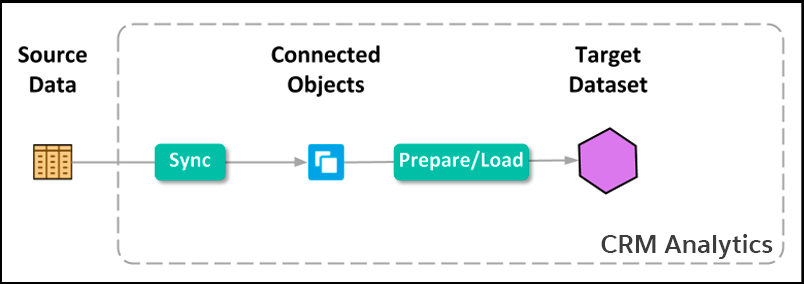
To set up access to source data, create a connection. When you create a connection, select objects and columns to pull data from. You can add a filter to the connection to extract a subset of all rows. In the connection properties, you also specify a user account that determines what data the connection can access. For example, to access data in Amazon S3, specify an Amazon S3 user account. If the user account doesn’t have access to an object, the connection can’t pull data from that object.
After you create a connection, run its data sync to extract the data from each selected object in the data source and store it in the corresponding CRM Analytics connected object. After you run a data sync for the first time, you can add the connected objects as sources for recipes. In data prep, you can add transformations to prepare the data in the connected objects and output the results into datasets.
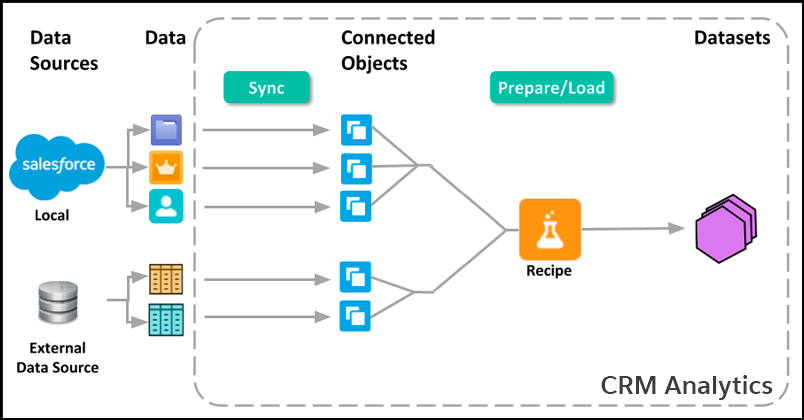
Run the recipe to create datasets. Continue to run them to refresh the data. You can run data sync and recipes on demand. You can also schedule them to run on an ongoing basis. To ensure that your recipes use the latest data, schedule data sync jobs to complete before dependent recipes run.

However, it’s important to monitor query performance when using Direct Data on large objects. If the Salesforce object contains millions of records, sometimes queries can be faster on a dataset than direct queries on the Salesforce object.
- About Datasets
A CRM Analytics dataset is a collection of related data that can be viewed in a tabular format. The data can come from many sources, including Salesforce objects, external data sources, and even other datasets. - Ways to Get Data from Data Sources Into Datasets
To populate datasets with data from data sources, you can import the data directly from the source. Or, you can extract the data from the source and prepare it before loading it into a dataset. - Plan for Your Data Integration Project
Before you build your data integration solution, think about the use case you want to analyze and the data you need to get you there. - Considerations Before Integrating Data into Datasets
This section covers expected behavior and limitations to consider before integrating data into datasets.
