
You are here:
Run Sequential Recipes with Staged Data
When your data strategy involves multiple recipes, you can reduce processing time by using staged data instead of datasets. Place the steps you would otherwise repeat into one recipe that outputs results as staged data. Subsequent recipes can then use the staged data as input nodes to do other work. For example, rather than merge account and opportunity data in several region-specific forecasting recipe, merge in an initial recipe that outputs the results as staged data, and use this data in the other recipes.

Staged data can’t be used in dataflows, dashboards, or lenses.
Staged data acts as “cache”, and isn’t suited to cases where the original records can’t be retrieved from the source system, whether that be Salesforce or outside. For example, don’t use staged data as a snapshot dataset where you read and write to the same staged data in a recipe. Also, don’t use a staged dataset as a “system of record”.
After performing a site switch or instance refresh, recreate the staged data from its original source using the appropriate recipes.
Build your recipe with Data Prep and add an output node. Write the output node to Staged Data.
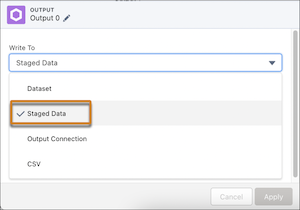
After you save the output, you can’t change the type. To change from staged data to a dataset or a dataset to staged data, create another output node.
Build your second recipe. When you add the input data, select the staged data from your first recipe.
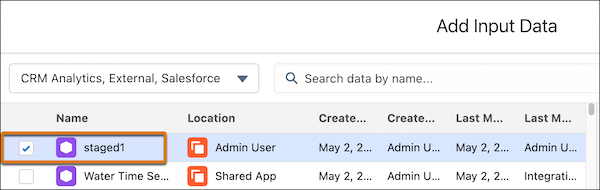
Continue to build and save your recipe. When the recipe sequence runs, the staged data is used as an input source.
Staged data is retained for 7 days and its rows are counted in the row limits for recipes.
