
You are here:
Advanced Filter in sfdcDigest Transformation
You define an advanced filter using a Salesforce Object Query Language (SOQL) WHERE clause expression. Use an advanced filter only if you are familiar with SOQL.


Let’s look at an example of an advanced filter. You want to extract only opportunity records that are owned by a specific user and that have either high value or a high probability of closing. You create this dataflow in the dataflow editor and add a filter in the Complex Filter Conditions field of the sfdcDigest node.
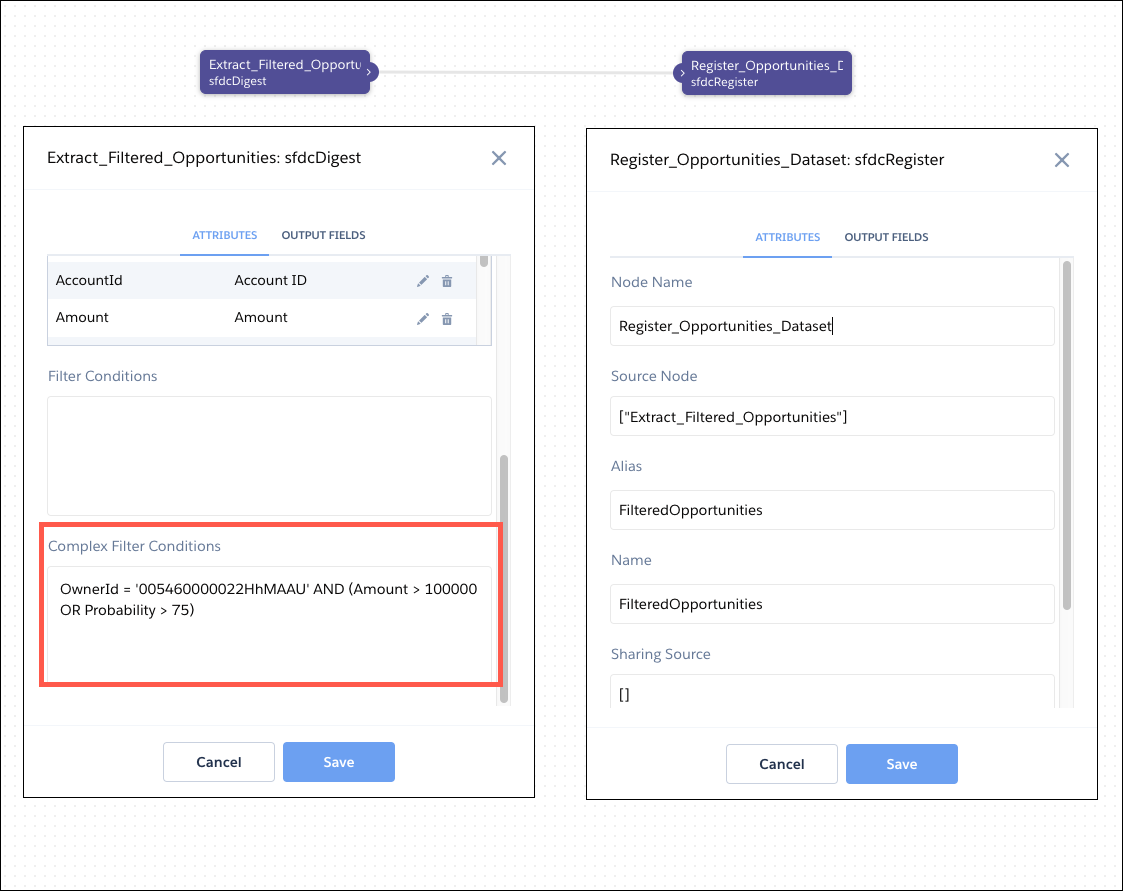
To add an advanced filter in the dataflow JSON, add a complexFilterConditions parameter in the sfdcDigest
node.
{
   "Extract_Filtered_Opportunities": {
      "action": "sfdcDigest",
      "parameters": {
         "object": "Opportunity",
         "fields": [
            { "name": "Id" },
            { "name": "Name" },
            { "name": "AccountId" },
            { "name": "Amount" },
            { "name": "StageName" },
            { "name": "CloseDate" },
            { "name": "Probability" },
            { "name": "OwnerId" }
         ],
         "complexFilterConditions": "OwnerId = '005460000022HhMAAU' AND (Amount > 100000 OR Probability > 75)"
        }
   },
   "Register_Opportunities_Dataset": {
      "action": "sfdcRegister",
      "parameters": {
         "alias": "FilteredOpportunities",
         "name": "FilteredOpportunities",
         "source": "Extract_Filtered_Opportunities"
      }
   }
}
Consider the following requirements for advanced filters.
-
Always enclose OR conditions in parentheses in advanced filters, even if there are no other conditions. For example, to extract only closed won or closed lost opportunities, use this advanced filter: (StageName = 'Closed Won' OR StageName = 'Closed Lost'). Excluding parentheses causes the dataflow to fail.
- If incremental sync is enabled on the Salesforce object, you can’t use subqueries in an advanced filter.
